

Entity Systems has developed a new method of managing goods within and between warehouses. It is called the Entity Management System and has a huge potential to change how ESG and Sustainability information is created and managed. The method can replace the Inventory paradigm and product serialization, and enables greater stock visibility, improves returns processes, and increases the metrics available for decision makers. It can handle a number of current and upcoming sustainability requirements, including the DSCSA, EU Falsified Medicines Directive, the EU Digital Product Passport, the EU Farm to Fork program, and SEC Carbon Emissions Scope 3 reporting.
Download the White Paper
- Join our Mailing list and Download!
- PDF copy of the freely available HTML version
- 57 Pages
- ISBN: 978-80-908557-0-0
ABSTRACT
Goods are normally modelled in an information system according to the ‘Inventory’ model of reality. Each individual unit is tallied according to its type (such as its Stock Keeping Unit – SKU), with the sum of these tallies being the total amount of goods in a specified location. Here a new model is proposed where any ‘thing’ in the real supply chain world is given a proper name and modelled with a corresponding folder in an information system. These can be items or containers, like a garment being sold, a soft drink, a box, a pallet, a truck, a warehouse. These are all termed ‘Entities’. The folders representing these Entities are nested within one another in a manner analogous to the real world. The classification and additional information about each Entity becomes an attribute of the Entity, this information is not contained within its name.
Adopting these changes has a number of benefits for the company using the system, and the supply chain as a whole. As each unit of product is received, it is individually tracked and thus the velocity of each unit through the facility is known, and statistics can be assembled on this data. All the current traceability requirements in typical supply chains can be met, such as Country of Origin, Batch/Lot traceability and serialization requirements. Unlike data stored in the Inventory model, adding more attributes to an item is much easier, as it is simply added to file(s) in the folder representing the item and strict data mapping is not required. This additional data can be sustainability / ESG information, like more information about the provenance of an item, the emissions attributed to an item, repair manuals or end of life information. Another bonus is that as each Entity can be labelled with its own name, the necessity for barcodes issued by a central agency (GS1) is no longer necessary at the retail level.
This work describes the conceptual framework of the Entity Management System and how it can be applied in a Warehousing / Distribution Environment or a Transportation Environment. This is based on the work of applying an Entity Management System in a small e-shop warehouse. The concept lends itself well to issues that are facing the supply chain today, a desire for more visibility of operations by businesses, and providing more sustainability information as increasingly requested by consumers, regulators, and investors.
PART 1: INTRODUCTION
This paper will begin with a short description of how the current Inventory paradigm functions, to set the stage for the second part which will describe the Entity Management System (EMS) in detail. The rules of the EMS, its components and how it classifies goods are described. Then, to bring these concepts a little closer to reality, a detailed description of how the EMS can be implemented in both a warehouse and a transportation company is described. After the functionality of the system is established, some of the differences between the Inventory paradigm and an EMS will be highlighted. An understanding of the requirements of traceability is necessary as well, and so current and upcoming traceability requirements in the supply chain, concentrating on the European context are described. A summary of how the EMS can meet some sustainability requirements is also outlined.
1 How Inventory Management Works
‘Inventory’ can be defined as a number of different types of physical goods which are in the possession of a company. Inventory can be the raw materials in a factory, the components of a product being assembled, the products being stored, transported, or any other goods that are owned by the company. Managing the ordering, processing, and levels of Inventory within a company can be done with an Inventory Management System. Inventory is described in an informational system by first classifying the physical objects in question into some classification that is determined by the company, and then assigning a quantity to each classification. Then, additional information or metadata about this table must describe where the goods in question physically exist.

The Stock Keeping Unit (SKU) is this standard way of classifying goods that are of interest to a company. All transactions, including sales and financial transactions are recorded according to the ‘SKU’, and the quantities of units assigned to that SKU.
1.1 The History of Inventory
The current process of managing inventory has its roots as far back as Mesopotamian and Egyptian inventory clerks keeping track of stocks of grains and other goods in their warehouses. An example of how an inbound transaction occurs can be illustrated like in Figure 2.
There are several important considerations to take away from this illustration. In both step 1 and 3, we can see what type of stock the king owns, the type of stock that it is, but other information about this stock is not kept in the same location. To find out where the wheat came from we have to visit the transaction table that is seen in step 2. Here, we can see that it was Bob that added the additional 2 bushels of wheat to the king’s pile. A major drawback in step 3, is that we cannot distinguish between the physical wheat that was the original 50 bushels, and the 2 that Bob added. This is a drawback for tracking where the wheat came from. For those unconvinced with the soundness of this example, consider this picture (Figure 3: Picture of Picking Locations in a Warehouse) of a pick location from a modern warehouse. Essentially stock is placed into each location loosely and taken out by a worker. Importantly, the origin of the stock is not typically associated with each location.


2. What is a Warehouse Management System
A Warehouse Management System (WMS) is an application that allows for workers in a Facility to record movements of goods, directs them to move goods if necessary, provides reporting information, and can communicate with other company software to report on the status of stock.
The specific actions that a WMS manages:
- Receive and Putaway goods
- Manage locations of goods
- Direct workers to fill and ship orders
- Maintain a record of goods on hand
- Do this in real time, manage all processes in the warehouse and communicate with other company systems[1]
While both Inventory Management Systems and Warehouse Management Systems are concerned with the goods that are in a company’s possession, a Warehouse Management System is more concerned with the goods at the operational level, while the Inventory Management System has a holistic view of the goods that are on their way into the Facility, what in in the Facility, and what has been sold.
PART 2: THE ENTITY MANAGEMENT CONCEPT – RULES AND KEY PROCESSES
Simply, an Entity Management System will be able to do everything that an Inventory Management System is capable of, plus have the capability of tracking every Entity, individually.
An EMS is capable of managing a record of all goods within a business with the same capabilities as an Inventory Management System of tracking, identifying, and storing information about all the possessions within a business. However, additionally, the EMS is capable of tracking each of these items individually in a way that greatly reduces errors about the accuracy of the business’ goods.
The EMS can claim to:
- Provide an easy, universal method of identifying and tracking items, cartons, and other discrete, sellable entities individually
- Allow for information about each unique Entity to be transferred as easily between organizations as the Entities themselves are physically moved
- Store information about the Entities in a way that reflects their real-world status in relation to other Entities (for instance: items in cartons on pallets in a storage rack in a warehouse)
- Can be used to report on and monitor a company’s assets and activities
Using this process can be useful for any party that possesses goods in the supply chain and then passes them on to someone else. The Entity Management System can form the basis of a complete Warehouse Management System, with hundreds of users and multiple types of containers (e.g. pallets, totes, cartons, etc.) being located, ordered, processed and tracked. All of these actions in the warehouse can be fulfilled by the EMS and all these actions take place within the 4 walls of the warehouse. The EMS can receive any type of inbound good, receive it, store it, receive an order, assemble it, and ship it. But do all of this while maintaining information about the item, for the final customer.
3. Structure and Components of an Entity Management System
In the same way that an Inventory Management System has concepts of Stock Keeping Units, line items and inventory buckets to maintain its model of reality, the EMS has its own concepts that help maintain a coherent data model of the physical world. This section will briefly introduce and define each of the necessary components of the model behind the EMS.
3.1 Defining and Naming Entities within an Entity Management System
An Entity in an Entity Management System is any item or container comprised of one or multiple items that is produced and further handled together. This is a very broad definition, but Entities are in fact much easier to understand than the concept of a ‘product’. For instance, Entities can be Items that are offered for sale as the unique item that a consumer can buy. Entities can also be containers, which are made up of items and / or other containers that are packed or assembled together.
Each Entity that is identified within an EMS must have a name. This name must be a ‘proper name’, and as such it does not include the classification of the Entity. So, the name of the Entity cannot be its Stock Keeping Unit plus a number, it must be a name that does not have any particular meaning. This separation of the name of the Entity from its classification is the second key component of the EMS.
Entities must have a name that is unique. For the purposes of an EMS, this means that each Entity must be unique in relation to that particular EMS. Entities that do not move between different EMS’ can have a code that is locally unique, but not necessarily universally unique. Entities that are expected to be moved and transferred to different businesses need to be universally unique. For example, a shelf location (which is an Entity) in a warehouse can be named ‘A01’ as it will never leave the warehouse, and this name can be used in multiple distinct warehouses without any issue, as long as it is unique in each warehouse.
3.2 Utilizing Universally Unique Identifiers for Entities
Universally Unique Identifiers (UUIDs) can be used for assigning unique names to the Entities that will travel between businesses.[2]
Dwelling on how unique a UUID actually is, and whether it is truly unique is not necessary. Most UUIDs will be ‘unique enough’ to avoid naming collisions between different businesses, especially when utilizing the unique MAC address of the generating machine as part of the hashing program that creates the UUID. In the rare event of a duplicate, this duplication would be identified during the receiving process and remedied operationally by renaming the duplicate Entity. If this happens, a lottery ticket should be immediately purchased by the person who found the duplicate Entity.
In addition to UUIDs being used as identifiers, other universally unique names can be used, including Decentralized Identifiers (DIDs) whose origin can be verified[3].
Also, it is only through the use of UUIDs that it is practical to use an Entity Management System. Creating unique codes without computing power would be impossible on a larger scale and it is this ability that makes an Entity Management System a feasible alternative to an Inventory Management System.
3.3 Folders representing Entities in a Hierarchy
The traditional Inventory Management System maintains different types of inventories within tables. Each row in a designated table holds a unique type of product, a Stock Keeping Unit. When a unit of product is sold or otherwise removed from the system, then the quantity of that SKU must be reduced by the appropriate amount. Conversely, when units are added to the system, then a count is added. When the Inventory Management System is applied to computers, then it lends itself nicely to the use of databases. Commonly, a database table is created to hold some of this Inventory, and appropriate adjustments are made through various programs which can be in written in a variety of computing languages and often interact with the database tables using the ubiquitous SQL language.
The EMS sits on a fundamentally different principal. The reader will likely be aware of the file system on their computer. You can save a file, within a folder, and have this folder organized within other folders based on your need for organization (or not). Imagining a physical system of boxes and items within boxes is quite similar. There are boxes that sit on a shelf and these boxes have items within them. In the same way, you can have a virtual representation of the Items (folders in your computer) within boxes (represented by a higher level of folders), on locations (represented by an even higher level of folders). This would be a level of detail that is not very necessary for the Mesopotamian accountant but is appropriate for an ecommerce retailer who receives 30% of the goods that they ship out back as returns.
The difficulties of a hierarchical database system, or nested database system are well documented[4]. For example, using a nested set model can overcome some of these difficulties but are inherently complex[5]. Meanwhile a file/folder system is easy to understand and holds the additional advantage at the structure of the data organization gives the user information about the physical reality of the Items and Cartons themselves. In the physical supply chain world, items, boxes and other containers are almost always organized in a hierarchical manner, rather than in piles of organized wheat as in the past, or for some bulk goods. Modeling all Entities in a system using a flexible hierarchy data system like a file / folder system can function for the purpose of maintaining records of stock.
3.4 Entity Management’s Model of Reality
An EMS uses folders as an informational representation of the reality of the warehouse, store, truck, or any other part of the supply chain. These can be folders that contain other folders and files that hold data. The basic idea is that if you have an item, a box or a truck, then these physical items in the real world are represented by folders in a file / folder system, and these folders are arranged in the same hierarchical way that the physical items are in the real world.
In Figure 4: Nested Folder Structure Analogous to the Real World, some of the folders contain files which describe the physical object in question. Each of the folders represent an ‘Entity’.
Let’s consider Entity-level tracking and how it can work under an EMS with a simple example. In our hypothetical example a warehouse will receive a shipment of widgets, place them into their records and then sell one of those same widgets to a customer.

In the first step, the contents of the box arrive at the warehouse. The information about the box can be supplied in a traditional, packing slip/list format and transformed to an Entity Management format, or directly supplied in the format seen below.
These are folders within a normal file system on a computer, that contain files which describe the item that is being received. Additionally, you will note that the physical structure of the box, is equivalent to the files modeled within the file structure. The 3 Item folders are placed within the carton folder.
The Items are received into the stock of the warehouse and placed into the ownership or ‘stock’ of the warehouse by being placed into the warehouse root folder. Within this warehouse root folder there are other folders which correspond to physical locations within the warehouse.
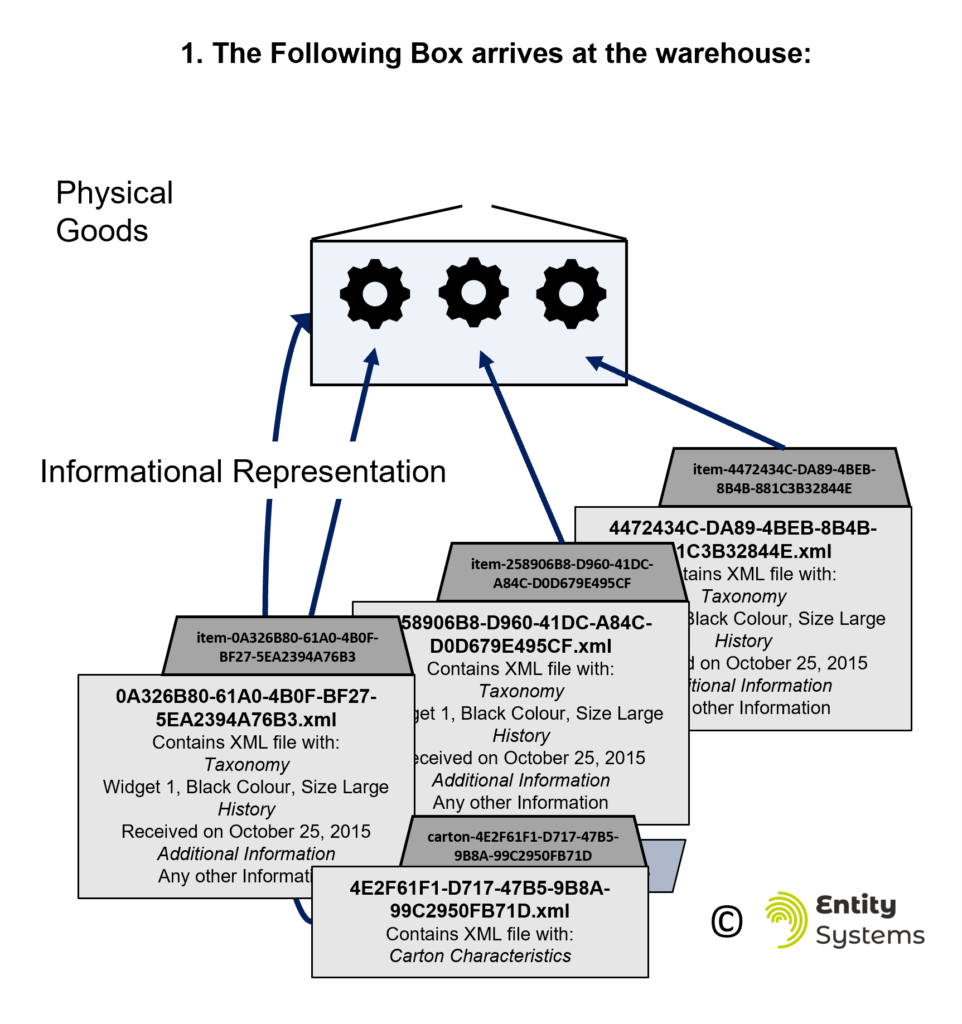
The Carton folder has now been placed into the warehouse and specifically has been placed in the sub – folder within the Warehouse that corresponds to the location where the Carton has been placed. At this point, the Carton has been accepted into the ‘stock’ of the Warehouse and is considered to be owned by the warehouse. An audit of ‘inventory’ would include this box in this count.

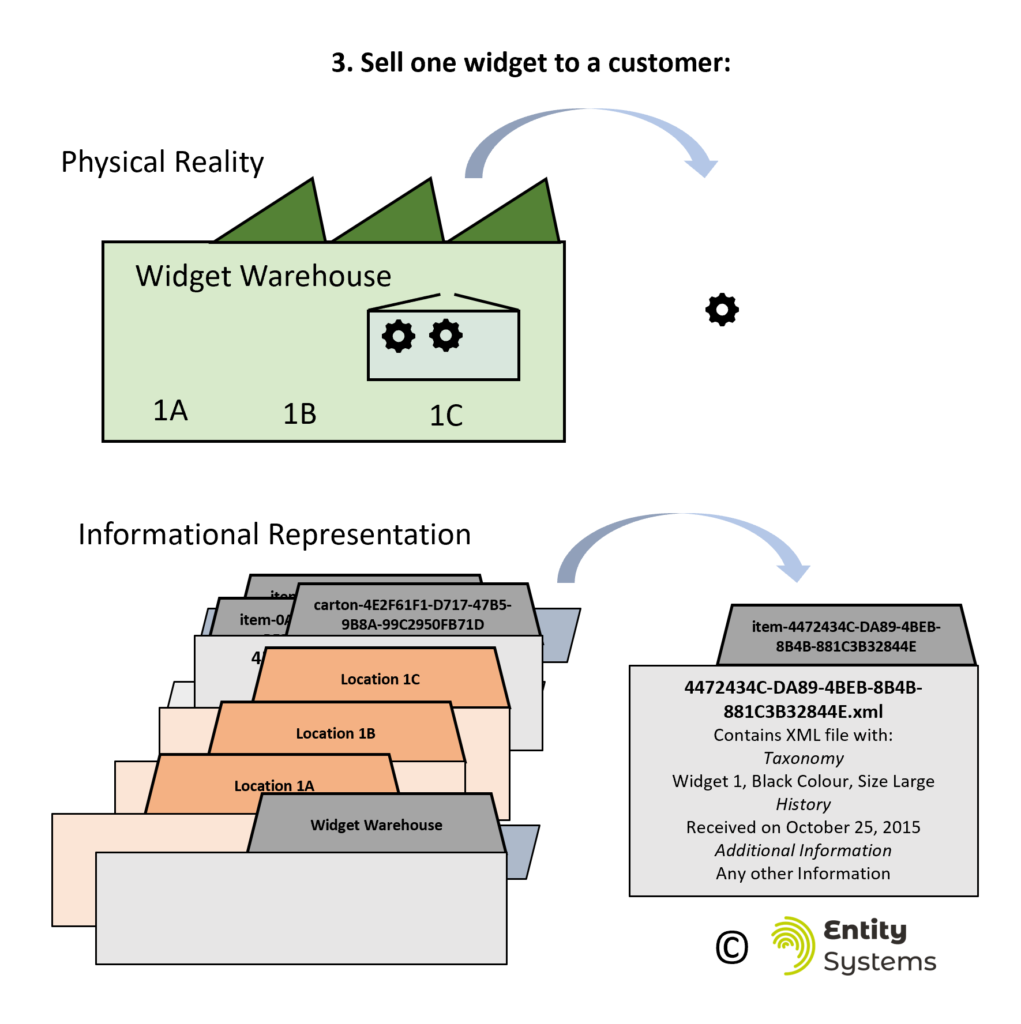
Now, the Warehouse receives an order for one widget and goes to fill that order (Figure 7: Widget being sold from a Warehouse and its analogy in the EMS system). The widget is taken out of the Carton and out of the Warehouse to a carrier which delivers it to the customer. At this point, the physical widget is transferred, first to the carrier, then from the carrier to the customer. However, the same file can also be transferred along to the carrier and eventually to the customer. Of course, the warehouse can modify this file to add or remove any information that is required and can also copy this information and extract criteria of interest.
This very basic example shows how a warehouse can manage transferring information from inbound sources, to storing that data within the warehouse, to transferring that information outbound to the customer.
3.5 Companies as Functional Entities
The term ‘Entity Management’ does exist and generally refers to business entities and the processes and documents defining those legal ‘Entities’. For example, this Capterra page references software that can used for managing legal Entities. Each business is at the same time an ‘Entity’ as defined above. To distinguish between the legal ‘Entities’ and the definition of a business ‘Entity’ used in this document, the term ‘Functional Entity’ will be used. Functional Entities are distinct businesses and can be recorded as such within an EMS. These could be vendors that provide goods, carriers, or platforms where goods are sold. These Functional Entities need to have a unique name in the EMS and associated information kept about them, like addresses or other characteristics.
Functional Entities can also have a unique URL (i.e. domain or subdomain) that uniquely identifies the Functional Entity. This is not a mandatory requirement but can help to uniquely identify the business among others.
3.6 Classification of Entities into Entity Type
In order to work with Entities in or between facilities they must be characterized into Entity Types. Entity Types are groups of Entities that share taxonomies of classifications. So let’s take a small warehouse as an example, which fulfills products for two distinct, unrelated companies. This warehouse would use an EMS, which would classify Company ‘A’s goods into Entity Type ‘ItemA’. Company ‘B’s goods are classified as ‘ItemB’. The warehouse has its own boxes which can be used to pack both company’s orders, and are classified as Entity Type ‘Cartons’, which go on Entity Type ‘Pallets’, which are grouped into Entity Type ‘Shipments’, which go on Entity Type ‘Trucks’. Each Entity Type has its own set of taxonomies, which is not shared with other Entity Types. So ‘ItemA’ Entities can be classified according to Company A’s requirements, like Product SKU, Color, Size; while Company B’s requirements will be separate from them.
Entity Types which we do not typically associate with having a classification can have one added if needed. For example Cartons can have taxonomies based on requirements of the warehouse, for instance a ‘Carton Type’ taxonomy, or ‘Carton Height’ taxonomy. Some common Entity Types that are likely to be used in warehousing or transportation are:
- Items
- Cartons
- Pallets
- Shipments
- Users
- Locations
- Vehicles
3.7 Using Inventory when it makes sense
There may be instances were designating an Entity just isn’t possible because of the end sale of loose goods. In this case, the Entity itself can have an inventory, as it can be composed of several sub-units. An example of such an item may be a box of with several weight units of fruit. In this example, sub-items may be pieces of fruit or weight units of fruit. At the place of the final sale, or during re-sales, the item may be consumed in several steps, with the Entity Inventory being consumed.
3.8 How an analogous ‘4 Wall Inventory’ is maintained
Inventory management systems usually have a strict definition of what is inside the four walls of a facility. They may have more than one ‘bucket’ or ‘table’ that contains what is ultimately inside a physical building, but there is a single version of the truth of what is in one place, and this rule is useful for purposes of allocating stock within a warehouse, and for generally knowing what assets are being held.
In the same way, the EMS will manage this requirement by having one folder that holds the truth of what is within the warehouse. So all stock that is in legal possession of the facility is located in this one folder that holds the model of the physical world. There may be other folders outside of this ‘possession’ folder that hold records that are items that are expected to be received, or have been shipped, but the ‘possession’ folder will hold the truth of what is within the facility.
3.9 Labelling Entities within and between Systems
There are 3 options for labelling any Entity, and the decision of which to use, or which combination to use is determined by the decision makers for the business. The label may have the form of, for example, printed text, a 1D barcode, a 2D barcode or an RFID tag. These labels are used within the EMS to move Entities from one Entity to another. The three options for labelling are to:
- Use the unique entity code itself on each of the Entities in its possession
- Use the URL of the Functional Entity plus the Unique Entity Code
- Use a taxonomy of the Entity type (e.g. a Stock Keeping Unit / EAN code)
Choosing between the three options depends on the goals of the organization. If using a 1D barcode, then option 2 will likely not work because the text will be too long to encode. If using a 2D barcode, than any of the three options are possible. Any of the three options are possible with an RFID tag.
There are pros and cons of using each of the three labelling methods.
| Pros | Cons | |
| Unique Entity Code | Can easily transfer the Entity between different functional entities and still refer to it. | Final Consumer needs to navigate to website first, then to the Entity page |
| URL + Unique Entity Code | Final consumer can easily find information about the Entity with one click | – Cannot use 1D Barcodes – text too long – When transferring to different downstream Entity they must relabel |
| SKU / EAN | Easy to integrate with legacy systems as this is how Inventory Management Systems work | – Easier to make mistakes – Programs and processes are more complicated within a facility |
Regardless of how the Entities are labelled when assembled to be shipped or transferred to the downstream party in the supply chain, the informational model exists which can always provide the additional information about the Entity which is not supplied in a traditional Inventory Management System. For instance, this additional information can be added to a customer invoice in regards to the specific Entity (or each piece within each line item).
3.10 Entities within a Bill of Materials
An Entity can also act as a component within another Entity and be ‘consumed’ into that Entity. This is an Entity that will be used within the facility for processing and won’t be sold further through the supply chain. When a Component Entity is processed and used within another Entity, then the information about the provenance of the ‘component’ can be added to other Entity, for the capability of fully tracking goods throughout the supply chain. While out of scope of this work, components can be seen as the instances of goods that are included in a Bill of Materials.
4 Moving Goods into and out of an Entity Management System
4.1 Folder Structure for Receiving and Sending
There is a specific folder structure that is adopted to help with processes surrounding the receipt and sending of goods. This folder structure is contained within an Entity that receives, or picks up, or sends or drops off, Entities from external sources. An Entity that functions like this can be termed a ‘Facility’. An example is a Warehouse that receives goods into it, stores them, selects various pieces based on requests, and then ships those goods out again. A Facility can also be a Truck. The Truck picks up goods from various locations, does not usually sort them, and then drops those goods off at another location.
There is a need for visibility and clarity on which goods are in the possession of the Facility, which goods are expected to be possessed, and which goods have left the facility after being possessed within it. These are the three basic classifications for all Facilities, and all Entities that are known to that Facility are contained within one of these three folders (Expected, Possession, and Sent).
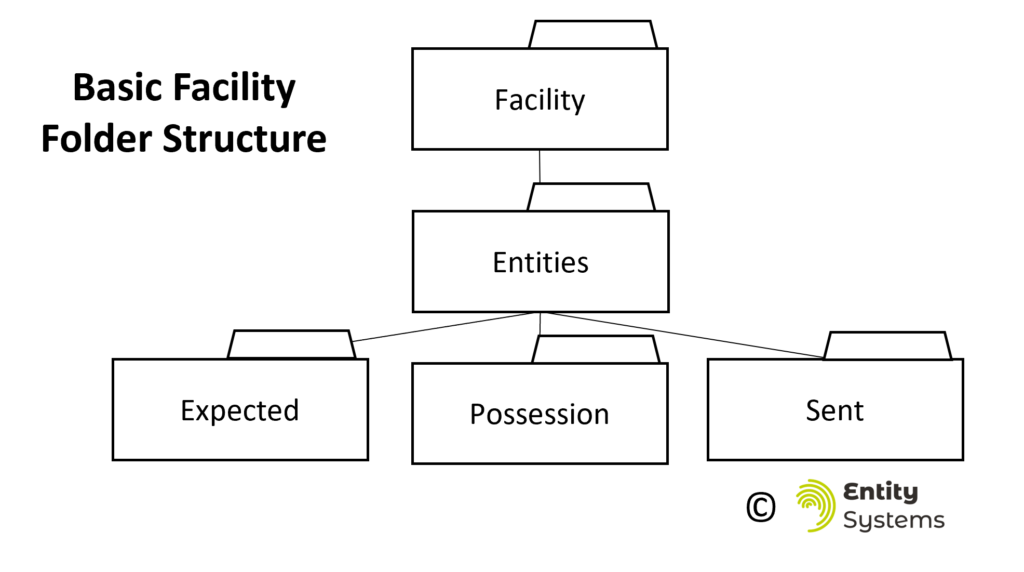
Various actors in the supply chain (Facilities) have different requirements. The requirements of a Truck are going to be quite different from that of a Warehouse. But the fundamental concepts of receiving something into an Entity’s possession, perhaps reorganizing it, and then sending it out again are the same. Typically, the items within a shipment will not be re-organized during the truck’s trip so the goods that are taken into possession are the same as those which leave the truck. So for a truck ‘Facility’, the three folders suffice to maintain a clear distinction between Shipments to be picked up, Shipments on the truck, and Shipments delivered.
A Warehouse is different, as the goods that are received are taken apart, organized, assembled into orders and then shipped out again. For this reason, a meticulous record must be kept of the condition of the shipments when received, and when set. Otherwise, information about the condition of the goods when received and sent will be lost. A process exists for how to maintain this record during the receiving process, and this will be described. To maintain these records, evidence must exist of which goods were received (the ‘Evidence’ folder) and which were expected to be received but were not (the ‘Shortage’ folder). Additionally, outbound shipments are archived in the ‘Expedited’ folder. As seen in the diagram, these three folders must be contained in an Archive separately from the three core folders. This is because the Entities within the three core (‘Entities’) folders cannot be duplicated, their uniqueness must be maintained within the ‘Entities’ folder.

Finally, the Facility folder structure can be modified to reflect operational realities, including having an ‘Expected’ folder at a different hierarchical level. For instance, in a transportation company, the ‘Expected’ folder could exist at the level of the Transportation Company Facility, and then again at the level of the Truck Facility. In this way the company dispatchers prepare the Shipments that are ordered by their customers and then move these Shipments into the Truck Expected folder to indicate to the Truck that they have been dispatched to pick up that Shipment.

4.2 Converting from an Inventory to an Entity Model
Moving goods into and out of an EMS requires the goods to fit into the EMS informational model. Because the EMS models information at a more detailed level than all other Inventory systems today, this is an easy process to undertake (for a computer program).

Essentially, the line items within an invoice / bill of lading / CMR can be transformed into the individual folders within the EMS, and they will be nested hierarchically in an analogous manner to their physical storage. This is how the process needs to work in Facilities that handle the contents of shipments, like warehouses. For those that do not need to handle the contents, the ‘Item’ folders are not necessary, and the shipment folder can simply contain a copy of the Bill of Lading.
4.3 The Receiving Process
For warehouses, the receiving process starts with the information being transformed into folder structure as described in the previous section. After this has taken place, the goods can be received into the warehouse by moving the folders from the ‘Expected’ organizational folder to the ‘Possession’ organizational folder to indicate that they are now within the 4 walls of the Facility. The shipment is verified and archived for record keeping purposes. The overall process is as follows:
1. Receiving:
- A packing list is supplied and converted to a folder structure OR the folder structure is directly supplied
- The delivery arrives
- Each Folder Representing the Items are scanned into the possession folder
2. Verification:
- After any potential shortages are identified, verification is run
- A record of what was received and shorted is created – this can be used for BOL/CMR purposes
3. Creating an Archive:
- The verification process creates an archive of the inbound shipment movement
As a result of following this process, the EMS can provide the following information to the Carrier that delivered the goods:
- Evidence that all goods are received (BOL / CMR)
- Send this as notification for the transport purchaser for invoicing
Also, following this process allows the proprietor of the EMS to maintain the following records:
- A list of what is expected to be received
- A record that all goods have been received
- Send this evidence throughout the organization so that payments can be made

4.4 The Sending Process
The Outbound method is simpler than the inbound, the containers are consolidated on a shipping location, a shipment and shipping documents are created and then this shipment is scanned out of the Possession folder into the Sent folder to indicate that the shipment was sent. Additionally, a copy of the Shipment folder is pasted into the ‘Expedited’ folder in the Archive. This last step is done if returns are being handled in the system.
5 Managing Orders in an Entity Management System
Normally, the complexity of the Inventory Management paradigm becomes apparent when allocating inventory. Allocation of inventory to orders creates all sorts of complications in an Inventory Management System, especially when considering multiple locations in a supply chain, considering whether stock is actually available, substituting one piece of inventory for another, and the idea of reserving inventory that is not yet available for a particular customer. One of the biggest advantages of the Entity Management System is the elimination of this complexity. In an EMS, each individual unit is modeled by its folder and this individual units, whether in the ‘Possession’ or ‘Expected’ folder is allocated to an order.
5.1 Example of Order Input
The orders themselves in an EMS are similar to a typical structure in an Inventory Management System. There is a database record of the order created, with information about the customer, payment, carrier choice, and any other information that is relevant to that order. However, the detail of the order is different in an EMS, as the Unique Identifier and relevant Taxonomy of each individual piece allocated for the order is listed.
An example of how this works in practice is as follows; first, the user creates the order by selecting the customer and whether they will be selecting Entities by a particular taxonomy, or by the Entities themselves.

A blank order header is created after this and the user can either select by a taxonomy, or by the individual Entity.
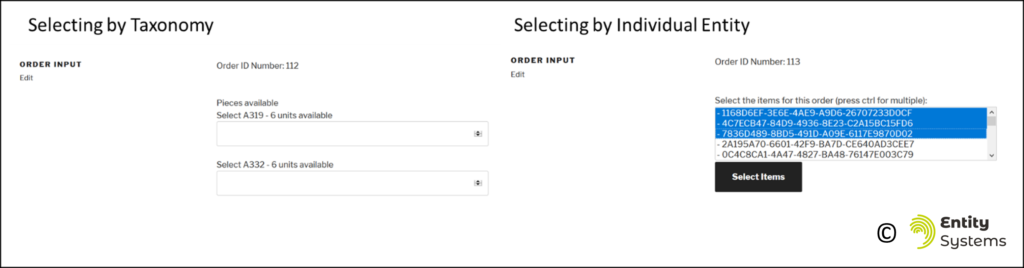
After selecting the Entities for the order, they will be allocated, and each individual Entity is targeted to be shipped to the customer. At this point, an order header exists that contains information about the unique order, and an associated table contains information about each unique Entity that is associated with that order.
6 Managing Returns in an Entity Management System
The returns process is a frequent area of confusion and inefficiency within a classical Inventory Management System. Another benefit of utilizing an EMS is the depth of record keeping that is enabled in the area of returns. Entities that have been shipped to customers from an EMS will have a UUID associated with them, so this UUID will be reused on the Entity’s return to the warehouse. Also, during the process of assessing the return’s quality, the EMS enables the operation to simply re-assign a different product code if the Entity can no longer be sold as a ‘new’ Entity.
6.1 Using an ‘Expedited’ archive folder supports managing Returns
To maintain a clear set of records on what has been received, in possession, and sent, during the returns process then an additional folder must be utilized within the ‘Archive’ organizational folder. This is so that the Entities within the ‘Sent’ folder are maintained as unique as outbound shipments are moved into the ‘Sent’ folder, and if an Entity is returned, the Entity folder is moved from the ‘Sent’ folder back into the ‘Expected’ folder to be ready to be received. In the diagram below, an Entity is expected to be received from a vendor, then is placed into possession of the warehouse, then shipped to a customer. After the customer is not satisfied with the Entity, they create a return, and the same Entity folder is moved from the Sent folder back to the Expected folder in a newly created inbound returns shipment. Here, it is important to note that it is in fact the same folder that is moving between the different organizational folders within the facility. This ability for the Entity to maintain its same identify throughout its lifecycle within the Facility enables the EMS to maintain a detailed Entity history. This is stored within a file in the Entity folder.

6.2 Maintaining and adding information to Entities during the Returns process
The process of returning an Entity and processing it is depicted in the Figure below. After the Entity has been shipped to the customer, it is found within the EMS in the ‘Sent’ folder. This indicates that it has left the Facility. A copy of this Entity folder has also been made into the ‘Archive / Expedited’ folder to maintain a history that the Entity has been moved. Then the Entity is moved into the ‘Expected’ folder which indicates that a return shipment has been created. It is then ready to be received into the Facility (for a second time). After being received, the Entity is inspected and if it is found not to have the same level of quality as when sent, then it can be re-classified and assigned a new product classification. However, no change of labelling is required for this to take place. The Receipt can be verified, and the Entity made allocatable to new orders after this process, and then the process continues in the same manner as the first time that the Entity was shipped.
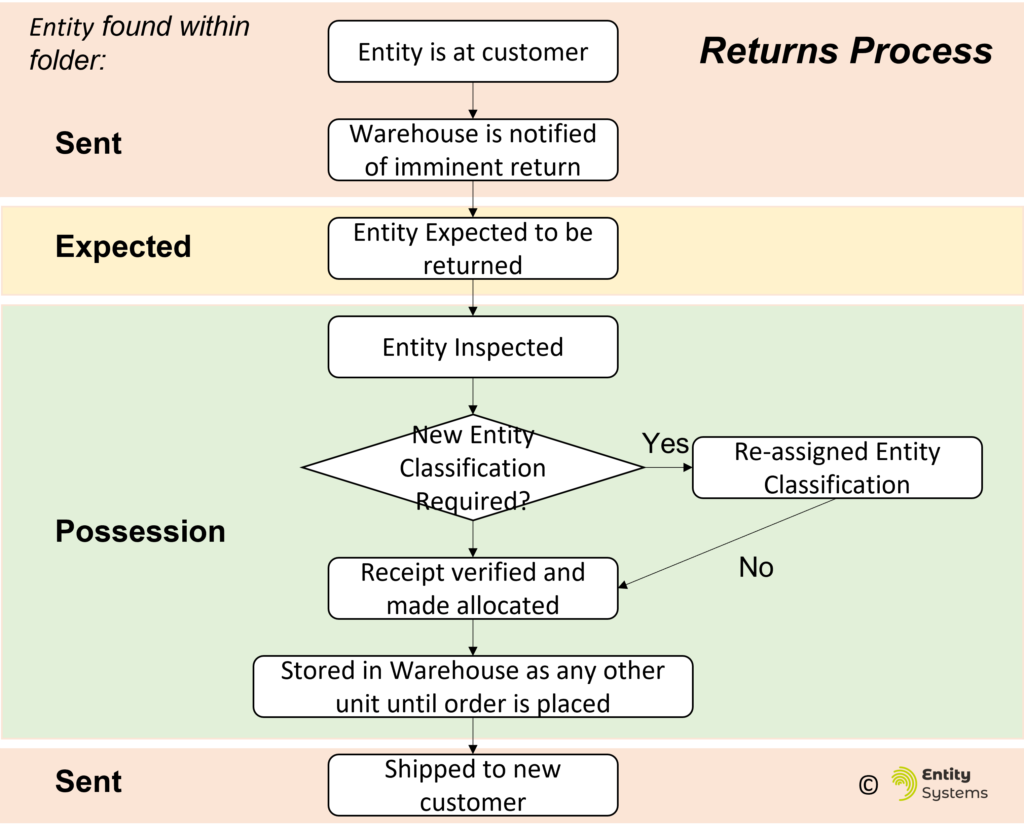
Throughout this process information about the vendor, dates of receipt and shipment, customer and any other information is maintained within a file in the Entity History.
PART 3: DESCRIPTION OF IMPLEMENTATIONS
The EMS can be implemented to manage stock that is within a business that deals with sellable units, like consumer or business goods. Or it can be implemented in a business that manages transportation of goods. Both implementations are described in this Part in more detail, especially to link the informational model to the application of this model in the real world.
7 Description of an Entity Management System as Implemented in a Warehouse
One implementation of an Entity Management System can work as the Inventory Management System and Warehouse Management System within a company that manages goods by receiving, storing, and then filling orders and shipping goods. This can be a fulfilment centre / distribution centre / warehouse. In this way, the EMS becomes the informational framework that keeps records of all the stock in the company.
7.1 Warehouse System – Informational System

The Facility’s organizational folders can be seen in Figure 17. These are the Entities 17-2, Archive 17-3, Expected 17-4, Possession 17-5, Sent 17-6, Shortage 17-7, Evidence 17-8, and Expedited 17-9 folders. These eight folders do not represent Entities themselves, however they organize the Entities contained within them.
The Entities folder 17-2 contains records of Entities expected to be in the Facility, those currently in the Facility, and those that have left. Importantly, there are no duplicates of Entities within the Entities folder, and these are the ‘digital twin’ representation of the real-world entities. All allocation of Entities to customers is done while the containers or items are located within the ‘Entities’ folder 17-2 or its subfolders. Found within the Entities 17-2 folder are two more organizational folders, the ‘Expected’ folder 17-4, and the ‘Possession’ folder 17-5.
All containers and items which are expected to be received into the Facility will be created or moved into the Expected folder 17-4. The format of the Entity folders should be as described previously in this document. For example, within the Expected folder 17-4 there can be a Shipment 17-10 named ‘DFB09EC4-599A-4188-A346-8FB2E0FF16DB’. This Shipment contains a Carton, represented by a folder 17-16, which can be named ‘EE9A74AE-8DF8-4979-8590-9B0CABE40EC0’. It is expected to be received and it contains 3 items, which are represented by folders 17-20, 17-21 and 17-22. Locations, Shipments, and Cartons are all different Entity Types as described previously.
Information about the expected Entities’ origins or carbon footprint can be added to the file describing the Entity which is saved within its respective folder. At the moment when the physical containers are received into the Facility’s possession, the folders representing the contents of the shipment are moved from the Expected folder 17-4 to the Possession folder 17-5, or directly to the specific folder representing the location (an Entity Type) within the Possession folder, in this example Location A1 17-11. The Shipment folder is left in the Expected folder 17-4, while only the Cartons and Items are moved into the Possession folder 17-5.
The Possession folder 17-5 is the only compulsory organizational folder in the Entity, and when all the Carton and Item folders within the Possession folder 17-5 are counted, then these are all the goods that are controlled by the Entity at that moment in time.
The Archive folder 17-3 serves to keep a record of the Entities that have been received into the Facility, and the Entities that have been shipped, in the same folder structure in which they were received or shipped, respectively. It is likely that the Entities will appear in both the Inbound and Outbound folders after being received, processed, and shipped. Therefore, unlike the Entities folder 17-2, the Archive folder 17-3 will contain Entities that are duplicates of others that may exist in the Entity folder 17-2. Within the Archive folder, the Evidence folder 17-8 holds a copy of the Shipment, Carton and Item folders and files as they were received or created in the Expected folder 17-4. The Shortage folder 17-7 holds a copy of the Entity folders and files as they were created in Expected folder 17-4 but were not received into the Possession folder 17-5.
For example, Shipment 2FE99FC3-B75C-45C6-9FB6-3B6BCA926E39 17-14 was received into the Entity in the past because its folder is located within the Evidence folder 17-8, and Carton folders 3EDC68FF-E5F5-4891-8B9C-F4637D697198 17-14 and 17-17 are located in both the Inbound Evidence 17-8 and the Possession folder 17-5, respectively. Additionally, the same Shipment 2FE99FC3-B75C-45C6-9FB6-3B6BCA926E39 17-13 is specified in the Shortage folder 17-7 and contains the Item C5E9C60A-61E7-49F9-B810-5440C8CA2F89 17-19, which means that this Item 17-9 was expected to be received but was not. By utilizing the different organizational folders, the Facility can identify and record which containers and items were received, are available, and were expected to be received but were not.
Finally, when Cartons and Items are shipped out of the Facility, they are first copied to the Expedited folder 17-9, and then moved to Sent folder 17-6. From Sent folder 17-6, Entities can be made accessible to other Facilities that request information about them and could be downloaded as a zipped folder. The example of this is Shipment 429C8EED-3D40-464D-86A9-0024D1BE0824, a copy of which can be found in both the Sent folder 17-6 and the Expedited folder 17-9, as folders 17-12 and 17-15 respectively.
7.2 Warehouse System in the Physical World
The model described in Figure 17 depicts the entire folder structure that can be encountered in a typically Entity Management System. However, it is the model of reality found within the detail of the Possession folder which shows how the EMS will work operationally Figure 18.

The Possession folder 18-10 contains the Entities that are under control of the Facility. Within this folder, the folders representing Entities are organized to be analogous to their real-world physical relationships. Figure 18 depicts how these relationships are represented. The physical reality 18-1 is a warehouse 18-3 that contains three locations: 1A (18-4), 1B, and 1C. On location 1A 18-4, a Carton 18-5 can be found, which contains two widgets 18-6. The folder structure representing these elements is an informational model 18-2. The folders representing the contents of the entire warehouse are found within the folder representation of the warehouse, specifically the Possession organizational folder 18-10. There are three folders representing Entities within the Possessions folder. These Entities are locations such as the Location-1A folder 18-11. Within the folder 18-11 representing Location 1A, there is a folder 18-12 representing the Carton Entity. Within the Carton folder 18-12 there are two folders 18-13 which represent the items. Within each Entity’s folder, there is a file 18-14 that describes the Entity history, the classification of the container or item (its taxonomy), and any other information that the Facility wishes to specify about the Entity. The name of the file 18-14 is just the Entity’s Unique Identifier, while the folder name is prepended with the Entity type, such as ‘Location’ (for 18-11) or ‘Carton’ (for 18-12), or ‘Item’ (for 18-13). In this way, the structure of what is being represented is much clearer to the user, and the classification of the Entity can be easily ascertained. Additionally, each Facility’s implementation can define a system of rules where some Entity Types cannot be contained within others, so that the real-world reality is not accidentally modified by persons using the system. For example, rules can be created that an Item cannot be located on a Pallet but must be placed in a Carton. Other examples include: A Location cannot be placed anywhere except the Possession location; or a Pallet cannot be placed in a Carton. During Entity operational moves, these rules can be validated before the program allows for a move to take place.
The contents of the file designating the container or item can be a file that contains key/value pairs that contain detailed information about the Entity. Importantly, there can be information about the Entity’s taxonomy, that is how it has been classified. This is done for allocation of the Entity to customer orders, and for reporting purposes by to ascertain the amount of Entities that are currently in various locations in the Facility. There can be information about the Entity history, for instance who handled the Entity in the past, the environment or carbon impact of the Entity and anything else that the Facility wishes to share about the Entity.
8 Description of an Entity Management System as Implemented in a Transportation Company
The same concepts found in one Facility of an Entity Management System can be applied to any transportation-based business, be it a Truckload operation, Less Than Truckload / Groupage, Courier or postal service. For these applications, the internal workings of the Entity Management System are not the focus, as they do not take apart and reassemble the components of Shipments (Entities). Transport companies need to focus on the transfer of information into, and out of each Facility. For example, an EMS can be used by an independent truck driver, who would have a basic version of an entire EMS, which would be able to pickup a delivery, drive with the order to the destination (the shipment Entity in their possession folder) and release this shipment from their possession (the delivery). The figure below shows the types of industry players that could conceivably standardize their operations by adopting EMS to manage their businesses and communications with other parties in the supply chain.

8.1 Transportation System – Informational System
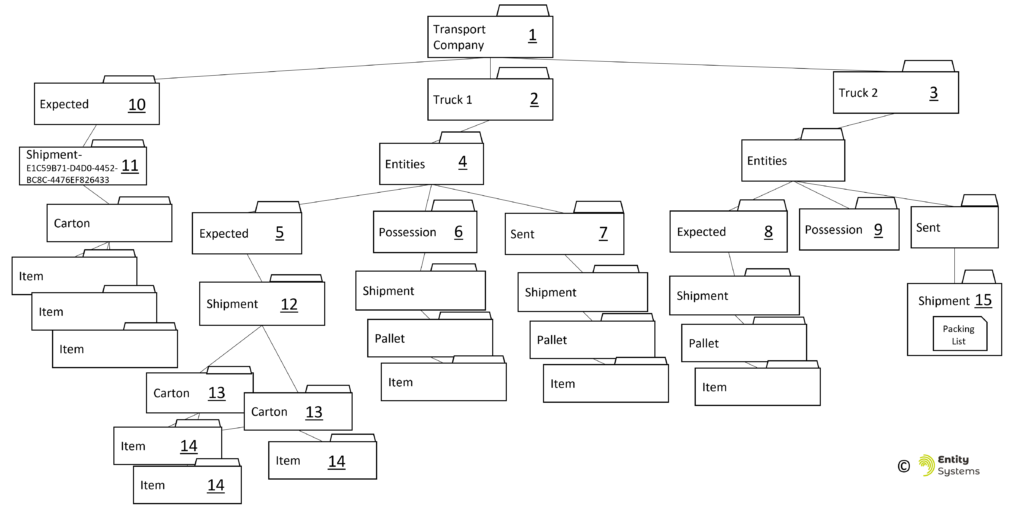
Figure 20: Example Informational System in a Transport Company depicts the Entity folder structure in a transportation company that operates two trucks that can pick up and deliver shipments.
One significant difference in this system as compared to the warehouse system is that most of the organizational folders are not located at the level of the Facility 20-1 but are located within the folder structure of the folders 20-2 and 20-3 representing the trucks. The trucks are an Entity Type. Nested within the Truck’s folder the organizational folders that we will recall from the previous example, the Expected 20-5, Possession 20-6, and Sent 20-7 folders. Notice that there are no Archive, Evidence, Shortage or Expedited folders. These archive folders are useful in cases when the contents of the Entities (the Shipments) are taken apart within the Facility and re-packaged for customer orders. This does not typically happen within a truck. Also, there is an additional Expected folder 20-9 that is nested at the level of the Facility. This is because the transport company will receive requests for movements that their trucks must perform these requests must be stored somewhere before they are assigned to a particular truck to perform. When a dispatcher in the trucking company decides that Truck 2 20-3 will be the truck that will perform the work required to deliver Shipment E1C59B71-D4D0-4452-BC8C-4476EF826433 20-10, represented by folder 20-9, then the dispatcher will move this Shipment folder to the Truck’s Expected folder 20-8. Then, when Truck 2 picks up the Shipment from the Shipper, the Shipment will be moved into Truck 2’s Possession folder 20-9. More often than not, a transport company does not have detail about the contents of a Shipment, and that is ok. For instance, the Shipment can be described with nested folders like 20-12, with a Shipment folder, Carton folders 20-13 belonging to this Shipment, and the Item folders 20-14 contained within the Carton folders. Alternately, the Shipment folder, like represented in folder 20-15 can contain a packing list which is provided by the shipper and contains only some information about the contents of the shipment.
8.2 Transportation Embodiment in the Physical World
The physical reality of the transport company 21-6 can be depicted as an office 21-3 and two trucks 21-4 and 21-5. The Facility’s records 21-6, which can be analogous to the office 21-3 contain all the folders representing Entities for this Facility. Truck 1’s folders 21-7 are located within the Facility records 21-6. Within each Truck folder, the organizational Possession folder 21-9 is located, as well as the Expected and Sent folders (not shown in Figure). The Truck 1 folder 21-7 contains one Shipment folder 21-10, which consists of a single Pallet folder 21-11, in which are two item folders 21-12 and 21-13.

The physical reality of the transport company 21-6 can be depicted as an office 21-3 and two trucks 21-4 and 21-5. The Facility’s records 21-6, which can be analogous to the office 21-3 contain all the folders representing Entities for this Facility. Truck 1’s folders 21-7 are located within the Facility records 21-6. Within each Truck folder, the organizational Possession folder 21-9 is located, as well as the Expected and Sent folders (not shown in Figure). The Truck 1 folder 21-7 contains one Shipment folder 21-10, which consists of a single Pallet folder 21-11, in which are two item folders 21-12 and 21-13.
PART 4: COMPARING INVENTORY AND ENTITY MANAGEMENT SYSTEMS
Now that we have an understanding of how the Entity Management Model works, we can compare in detail the differences between Inventory and Entity Management Systems.
9 Summary of Differences between Inventory and Entity Management Systems
The following table outlines the major differences, and advantages, of the Entity Management System when compared with an Inventory System. However, this section begins with the observation that both systems are in fact models of the reality of the supply chain.
| Inventory Management | Entity Management | |
| Purpose | Models the reality of stock within a business | Models the reality of stock within a business |
| Naming | Goods are named according to their classification | Each Entity (referent) is given a Proper Name |
| Preventing Collisions between Identifiers | Receive identifiers from one organization – GS1 organization | Uses Universally Unique Identifiers |
| Information storage | Relational Database – Tables holding counts of a unique product | Individual files containing classification and other information about each item |
| Counting Goods | Counting and Maintaining ‘Buckets of Inventory’ | All entities within the ‘Entities’ folder can be counted |
| Location of stock | Held in additional field in table representing containers or locations (or multiple tables) | Shown by the location of the folder in the file structure |
| Transferring Goods between parties | Creating a list of the items / boxes and their quantities | The folder containing all containers and items within it is copied and transferred |
9.1 Inventory is a Model of Reality
Current writings, industry discourse, academic texts that are concerned with Inventory all omit an important truth. Inventory is a model of reality, not a representation of reality itself. Meaning that Inventory is not the reality of the physical items that exist in a supply chain, it is a representation of those physical items in a model. Similarly, a model of today’s weather will not be the same as actual weather that you experience. This is an important point as current textbooks and methodologies do not explicitly mention, or even allude to the fact that the stock in a Facility is being modeled by the Inventory concept.
In the same way, the Entity Management System is also an abstraction of reality, but it models reality with the file and folder concept. By recognizing that the existing paradigm is a model, and that companies can simply choose a new way to organize their goods, allows for a lot more flexibility in choosing how to store information about their goods.
9.2 Goods are currently ‘nameless’

A key innovation of the Entity system is that it names Entities uniquely. John Stuart Mill defines Proper Names as “a word that answers the purpose of showing what thing it is that we are talking about but not of telling anything about it.”[6]
From this definition we can see that in the inventory paradigm, proper names are not used to define and label stock. A SKU refers to any number of goods, it is a classification of stock. Indeed, the urge to name goods by their characteristics is so strong that even when Inventory systems do track individual items (mostly in the pharmaceutical industry), the label of the item includes its characteristics and only suffixed with an integer is unique only for the particular product (serialization process). An example of this is the GS1-128 Barcode that is used in the Pharmaceutical Industry. The GS1-128 standard includes the ability to label stock with a barcode that contains data about the item.
The Entity Management System takes the intellectual leap of naming items uniquely, and then storing the classification of the items as an attribute of the record of the item. By separating the item name from its classification, the system becomes simpler and more capable. For instance, benefits of this change include:
- The ability to receive items without knowing their classification and classify them after they are stored.
- No need to re-label items that have been returned if their quality is different from the first time they were sent.
- Sell and re-sell items down the supply chain and no one has to re-name them, even if they do change the classification for those items.
- Maintain a record of the provenance and CO2 emissions of the individual item. This can be used for ESG purposes and be communicated to the final consumer.
9.3 Recording Stock Locations
Most Inventory Management Systems do not record stock locations, this capability is mostly kept for Warehouse Management Systems in the existing Inventory paradigm. As seen in Inventory System shown in Figure 2: Inventory Buckets in Ancient Times, record of the stock exists and refers to a location (the pile of wheat). In many WMS today, a table exists that has a record of Inventory, and then a different table or tables will have a record of the locations of that Inventory. These records of Inventory or ‘Buckets’ are managed to ascertain the amount of stock that exists in a company.
In an EMS, all stock is organized into the organizational folders discussed previously and counting the amount of stock that exists is done by simply counting the folders representing stock within the appropriate organizational folder. The complexity of managing multiple tables holding Inventory and synchronizing them is simplified greatly with the modeling of Entities in folders.
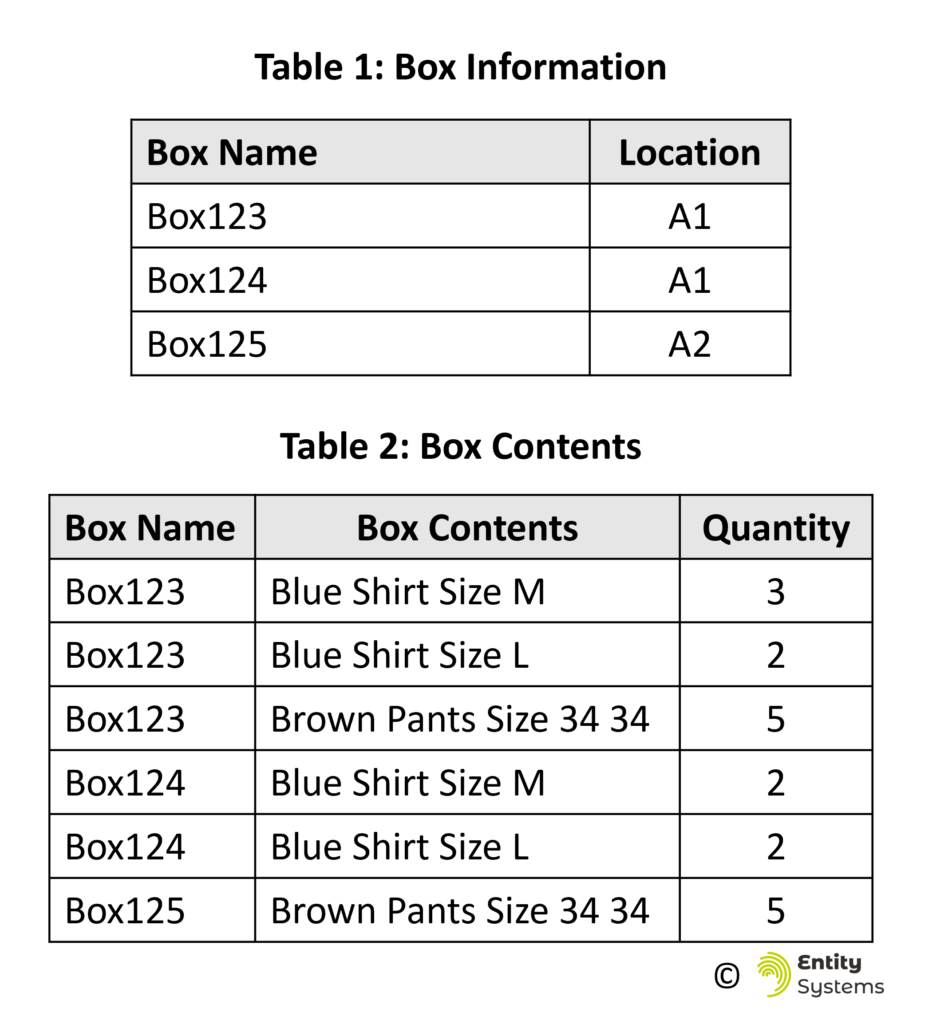
Physical locations are also not managed in a consistent manner across Inventory systems. In a WMS, a record must be created of a box that contains Inventory, and a record of where this box is located also recorded in the WMS. However, it can become more complicated as there may be various SKUs inside the box, but the box itself is in one location. So 2 tables are required, one with the box location, and another with the box contents.
The model of reality that an EMS uses also simplifies this as the folder representing the box and the items within it are all modelled as folders, nested within one another in a manner analogous to the real world. Additionally, when items or the box is moved to another location, then the folder representing that Entity is also moved.
9.4 Entity Management Model Enables Easy Transfer of Information between Parties
The transfer of goods between parties today usually involves the transfer of the goods themselves, plus an acknowledgement of the condition and quantity of goods transferred. Often, a packing list is printed on a piece of paper and checked off by the two parties. Finally, a transfer of ownership and / or liability is done with a Bill of Lading / CMR and usually both parties sign this document.
The creation of this document is usually done on a customized basis by the inventory program of the sender, and the items and their quantities can be listed, or the containers that the items are contained within are listed. The complexity of this step, and the difficulties of standardizing this process should not be underestimated. For instance, if you have 5 pallets, each with 20 boxes, and each box has about 10 units of inventory, for a total of 1143 units, how do you itemize this list? It depends on the industry and relationship between the sender and receiver.
With an Entity Management system, the preparation of documents for transferring becomes extremely simple, and more importantly, standardized. The 5 pallet folders, which each contain 20 box folders, which each contain folders depicting the amount of items that are contained within the particular box. These folders can be moved from the sender to the receiver computer, and with this transfer of folders, all the information about the origin of the goods, and any other information that the sender wishes to pass down the supply chain is transferred.
10 New Metrics Enabled by Entity Management
The EMS allows for a number of new metrics that which can allow for deeper analysis of the operations of a business. The possibility of drilling down in data to the sold Entity and connecting this Entity to the inbound shipment and vendor opens up a variety of possibilities of insights into the operations and sales in the business. Additionally, the unique property of an EMS, assigning each Entity a proper name, allows for new metrics to be developed in the area of Returns. Also, because an EMS is a more detailed model of stock than the inventory model, data can always be aggregated, and current metrics calculated.
To examine the metrics that are enabled by the EMS, we can use the example of a hypothetical distribution company. The company has records of 100 Entities, from 3 different vendors, received over 6 inbound shipments over the course of a year. These 100 Entities are ‘shipped’ randomly between 1 and 180 days from their receipt. The products are sold with a 60% markup from the purchase price from 2 of the vendors, and the third vendor sells the same products at a higher price. This is a highly simplified company but we can use this data to illustrate the potential of EMS driven metrics.
10.1 Measuring the Velocity of Stock
How quickly does stock move through a company? Inventory Turnover is one current metric that simplifies the speed at which inventory is purchased and sold. It is used to show the strength of sales of a company, and its value differs based on the industry and types of goods.

Equation Source[1]
The Inventory Turnover ratio can be elaborated upon by in an EMS by using the ‘dwell times’ of Entities in an EMS. Because the EMS monitors each Entity separately, we can calculate the ‘Dwell Time’ of each individual Entity, and then calculate statistics based on this distribution of dwell times.

These individual Dwell Times can be combined to summarize the volume of stock that is in a Facility. This can be visualized in a chart similar to a Gantt chart where the dwell times of each item are shown together in a chart over a time period. In Figure 24: Depictions of Dwell Times, the different colours indicate the vendor of the goods.

Now that we can calculate the amount of time each individual Entity is in the facility, we can handle this as a distribution of data and calculate various statistics on the amount of time spent in the facility by all Entities, and compare this to other attributes of those Entities, like the cost, margin earned, vendor, etc. Statistics on the example data provided can be seen in Figure 25: Example Descriptive Statistic of Dwell Times.
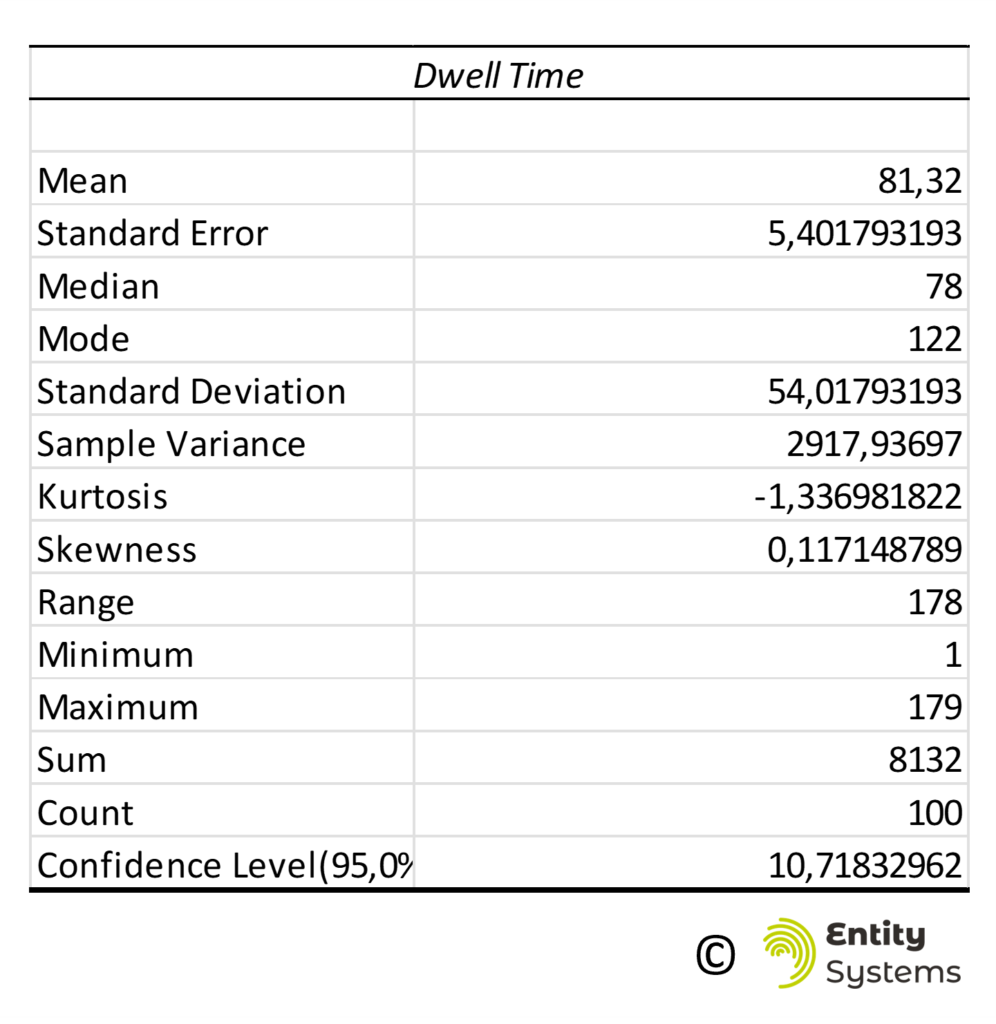
In addition to having statistics on the average amount of time that Entities are in the Facility, we can also determine which Entities are in the Facility for longer than normal (for instance, longer than 3 standard deviations), and then take action to identify why these Entities are still in the Facility. Also, having this metric offers a new opportunity for 3PLs to charge for their services in a new way, and billing for the dwell time for storage charges.
The sum of the value of Inventory that is held is used as a metric of how much Inventory there is in the business. This is a snapshot of Inventory at one time, typically at the end of the month. In contrast, the Dwell time of all Entities over the course of a period of time can be easily quantified using the sum of the Dwell Days in a Facility. This sum of the time that is spent by Entities within a Facility and can be compared to the Cost of Goods statistic, as depicted in Figure 26: Comparison of Cost of Goods Inventory and Dwell Days. The total Dwell days can be seen to be a more accurate statistic than the Cost of Goods as it reflects amount of goods in the Facility over all days, not just an averaged end of month statistic.
10.2 Profit per Item
It is common for both purchase and sale prices of goods to vary, and to vary over the time period within which those same goods are purchased and resold. The dynamic nature of prices means that Inventory systems use estimates and averages to determine both the Cost of Goods and the profit earned on each item sold.
Theoretically, if a strict First-in-First-Out policy is followed then the cost of the products sold at a particular time could be determined. But as tracking individual Entities is not possible in most Inventory systems, it is also not usually possible to attribute the purchase of a particular Entity from a vendor to a particular sale to a customer. This lack of visibility in the history of the Entity means that the actual cost of goods sold during a period is in fact the average of the costs of the goods purchased in some time period.
With an EMS, a lot of clarity can be gained on the profitability of a particular Entity. For instance, Table 3: Breakdown of Cost and Margin earned by Vendor shows the breakdown of cost and margin earned through the sales of goods by vendor. These statistics are not possible to compile in an Inventory system.
| Vendor | Sum of Cost | Sum of Margin | % Margin |
| Bruknapp Clothing | € 659 | € 395,4 | 60% |
| Premium Clothing Mfg. | € 430 | € 146 | 34% |
| Reliable Manufacturing | € 591 | € 354,6 | 60% |
Additionally, the impact of the ‘more expensive’ vendor on overall profitability can be seen in Figure 27: Impact of Purchase Price on Margin Earned. After the receipt of the shipment from the more expensive vendor in August, the impact is seen until the end of the year in the percentage margin figures.

Other areas in the Facility where the detailed visibility into profitability could be useful is to attribute costs of operations on the item, to that particular Entity. This is especially relevant in an omni-channel warehouse where orders are filled for wholesalers, retailers, and direct ecommerce in the same facility. But there are different handling costs for each type of channel. Tracking the costs of operations on each Entity can show the true differences in channel profitability.
10.3 Returns Statistics and Total Costs
As the name of each Entity is separate from its classification, an Entity’s history, including origin can be tracked even after Entities are sold, returned, and re-sold. The entire lifecycle of the Entity can be tracked. This is important with returns as many of the data issues that contemporary supply chains have with returns are related to the re-classification of items after they have been received back into the facility. In the EMS, the classification of the item (its ‘SKU’) is an attribute of the Entity, not its definition. So, the Entity is not re-defined, nor re-named, its classification is merely changed in the attributes of the Entity.
This information can be added to the history of the cost of the Entity in the manner shown in Figure 28.
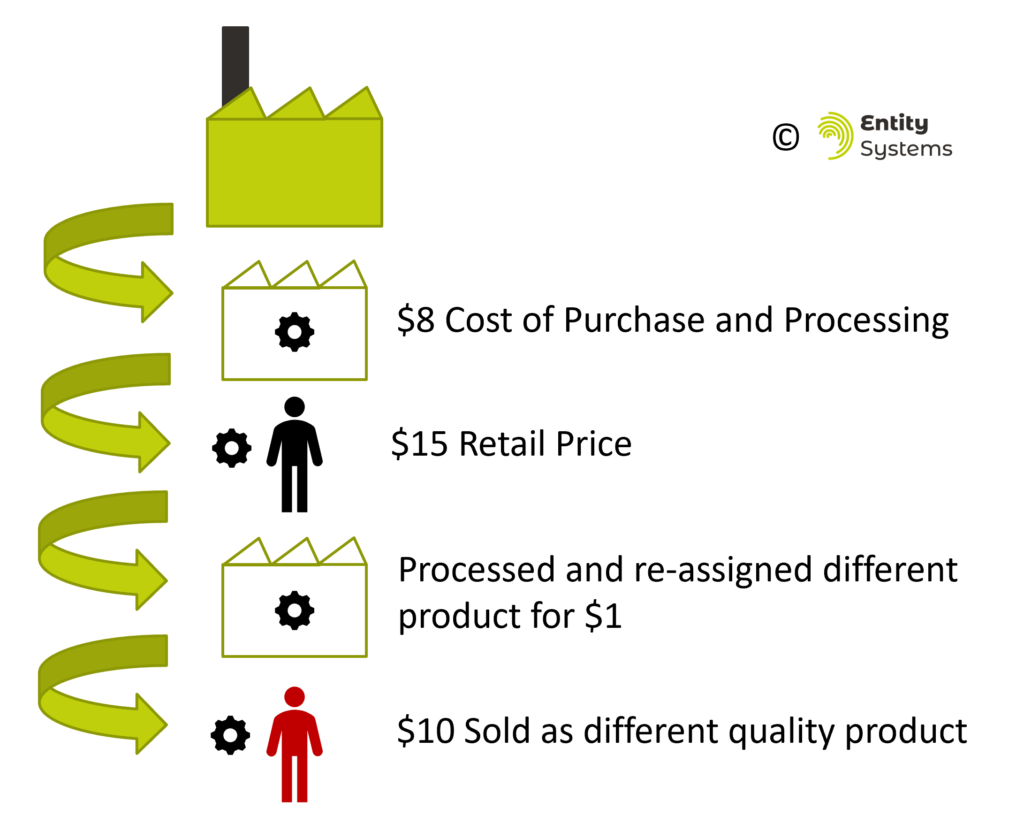
After this type of information is added to the history of the cost and profitability of the Entity, it can be added to the statistics that describe the sale of all Entities in the Facility. The opportunities for digging deeper into these statistics to improve profitability is exciting. Suppose that returns are higher from some vendors than others, or after being processed in a particular facility, or at a particular time of day. The history of these Entities can be cross-referenced with any number of other attributes of the Entity, and this could greatly speed up how processes in a business can be improved.
11 Stock Accuracy is Drastically Improved
The structure of the EMS information system dramatically improves the accuracy of record-keeping. There are several reasons why ‘Inventory’ inaccuracies will be minimized:
- Math errors can no longer lead to losing Inventory (like scanning an Entity twice)
- Standardized manner of handling allocating goods before they are received
- Negative Inventory is not possible
- Pre-packaged Inventory / sale of ‘sets’ handled in a far superior manner
Working with databases can lead to math errors impacting the accuracy of stock counts. For example, a crash of a program that removes stock from one location in a warehouse (like a physical shelf) and moves it onto another location (like a cart that a worker is pushing) can cause the worker to perform the same action twice, leading to more Inventory being in the shelf location physically than there is in the computer system. These types of errors are usually fixed in systems, but often a ‘check’ of a physical location involves scanning the SKU barcodes of the same product, to count how many such items exist in the location. There are methods to increase the accuracies of these ‘cycle counts’ but they can still be incorrect. An EMS, as it keeps track of every Entity as a unique code, does not have these issues. The users in the Facility are forced to scan the unique code of each item, which should resolve these issues.
It is common for some inventory systems to allow for ‘negative’ Inventory so that stock can be back ordered from vendors and then immediately resold. This allows for a lot of potential mistakes (if the order is cancelled, partially cancelled, inbound goods don’t arrive as expected, etc.) ‘Negative’ Inventory can also occur during operational errors in a distribution facility.
The EMS allows for goods that are ordered to be allocated before they arrive into the Facility, so that the potential for negative Inventory is minimized, and by its very nature of describing the stock as files instead of numbers in a table, it is not possible to have a ‘negative’ file or folder.

Pre-packaged goods ‘pre-packs’ that can be sold either as a ‘set’ or as the individual items contained within the ‘set’ are often hard to describe in Inventory systems. This is because both the ‘set’ and the items within the set must be described as a different product, as they have a different price. However, when the ‘set’ is sold, then the inventory must be reduced from the individual product as well. But how are the costs and margins calculated? Every different permutation of this problem must be thought out in an Inventory system and resolved.
In an EMS, this is not an issue. The ‘set’ will have one folder allocated to it, with a sales price associated with the ‘set’. In the EMS folder structure, each individual bottle will have its own folder, with its own price. These folders representing the individual bottles are nested within a folder representing the ‘set’. When the ‘set’ is sold in the EMS, then the files representing the bottles are removed as well, reducing the ‘Inventory’. When all individual bottles are sold from a particular pack, then the folder representing the ‘set’ is empty and can be deleted. Both prices and ‘Inventory’ is kept up to date easily.
12 Using Entity Management to Manage Stores
Currently, goods sold in retail stores, including online, require a product identifier which is guaranteed to be unique for that product. The reason these codes are guaranteed to be unique is because the manufacturers of goods are compelled to buy these unique codes from the GS1 organization[7] which sells blocks of unique codes to manufacturers. Selling goods in a retail store or on a major platform like Amazon requires most goods sold to have a barcode purchased from GS1. If every manufacturer buys these codes from one organization, then they will always be unique and duplicate codes (the same code issued by two different manufacturers) cannot happen.
An EMS allows for codes to be generated within an organization that can be used for point-of-sale purposes within that organization, and in downstream organizations. In effect the EMS can replace the need for purchased barcodes from the GS1 organization. The Entity Management System can be used for Stores Management.
There are two different potential methods that can be used to utilize an EMS for Point-of-Sale (POS) transactions.
- Use the EMS for the POS transaction and assign the retail price within the EMS
- Existing POS calls EMS with the QR code containing the Entity’s Unique Identifier for a retail price
A retail organization using the EMS for their POS transactions can associate the unique Entity ID with a retail price at the time of purchase from a vendor. When preparing the Entity for sale, this price is then stored within the master data for Entities within the store, and at the time of purchase this ID is read and the associated price used for the transaction.
The second method involves using the data of the upstream partner who is using the EMS. The POS system does not have to be an EMS. The upstream partner must label each Entity with a QR code that stores the URL+UUID. The URL is the upstream partner’s EMS instance, and the UUID is the Unique Identifier for the Item. This URL is also an API endpoint which returns the Entity’s retail price as designated by the upstream partner. At the time of purchase, the retail POS system can call the URL+UUID which is labeled on the physical item. The call from the upstream partner will then return the retail price which can be used for purchase. The benefit of this system is that the Entities do not have to be barcoded again and the POS retail system does not have to be an EMS.
13 Managing Multiple Vendors’ Inventory
Supply chains are complex, and a lot of this complexity has to do with the relationships that exist between parties in the supply chain. In transportation, it is common to use contractors to do the physical work of delivering the load. In distribution, it is common to contract a ‘3rd Party Logistics Provider’ (3PL) to receive, store, and fill orders for a company. Also, e-retailers often sell items that they do not physically control, and rely on the vendor to ship the items directly to customers (i.e. ‘Drop-Shipping’). Additionally, it is common for companies to do a little of each, to partially manage their own inventory, and partially outsource it to vendor managed inventory. It is also possible for 3PLs to manage more than one customer’s goods in their facility, and these are often kept physically separate to maintain integrity of the goods.
A characteristic of the Entity Management System that allows for multiple client’s goods to be recorded distinctly, yet they could easily be physically mixed, is the concept of the ‘Entity Type’. This allows for each different client’s goods to be recorded as a different ‘Entity Type’, with its own taxonomy. This way multiple client’s goods and records of these goods can be mixed while in the same facility.
PART 6: TRACEABILITY AND SUSTAINABILITY
Traditional Inventory Systems must add a lot of complexity to enable the Traceability of goods. Database tables must be modified, processes to track goods added to the physical flow of goods, which increases costs. Because of this, traceability is usually added to Inventory Systems on an as-needed basis, usually related to regulatory requirements.
There are many existing regulatory requirements. The most common that many consumers will recognize is the need to track the Country of Origin of goods. There are others that are common for food safety like batch/lot tracking. The pharmaceutical industry is another that is very concerned with traceability for safety reasons and some countries are requiring the serialization of products.
In addition to these traditional traceability requirements, there are new, growing requirements related to ESG reporting and sustainability. A review of some of the current and upcoming traceability requirements in Europe will be described.
The Entity Management Paradigm takes a different approach to managing data from traditional systems which is to add information about Entities into the Entity’s files rather than adding more information into a database. Because of this, whatever a company records about a concrete Entity will be kept and can always be viewed later. Adding more information can be done easily to new Entities, and with more difficulty to existing Entities. The critical difference is that every Entity Management System, no matter how simple or small, can handle any traceability requirement that a company may face in the future, making the system extremely future-proof. Even traceability requirements that do not currently exist will be able to be handled because of the way that data is handled in an Entity Management System.
14 Traditional Regulatory Requirements and Capabilities in Traceability
Traditional regulatory requirements in traceability have been centered around Country of Origin requirements (for political / taxation reasons) or food and pharmaceutical safety. These requirements are placed on companies that operate within an industry and are enforced through inspections of facilities in more highly regulated industries (like pharmaceuticals) or enforced during customs declarations (like Country of Origin). Each company has requirements that they are expected to meet, and they do so, often with the help of their Inventory / Warehouse Management System.
14.1 Country of Origin Requirements
Most major markets have regulations surrounding the disclosure of ‘Country of Origin’. Country of Origin means the goods need to be labelled with the country where the last substantial change to the time took place. Companies need to be able to track this to sell their products in markets like the EU, and often contemporary Warehouse Management Systems products have a Country of Origin associated with them. Also, in the European Union, there are additional requirements for different types of goods, such as meat requiring to be labelled with the place of rearing and slaughter of meat.[8]
For a traditional Warehouse Management System based on inventory, this means that the Country of Origin must be associated with the product when received, so that this information can be stored and transmitted when the goods are shipped. If there is more than one Country of Origin for a single product, then these goods must either be renamed into different products or tracked separately through the facility.
Requirement:
Create new Products for each country or track product countries in Warehouse
14.2 Batch or Lot Traceability in Certain Industries
A Batch or Lot of goods is defined as “a quantity produced together and sharing the same production costs and specifications”[1] As previously mentioned, this is important in food and pharmaceuticals to meet regulatory requirements.
These regulatory requirements concentrate on being able to track goods that are found to be contaminated and prevent them from being sold or inform buyers not to consume them if they have already been sold. So major ERP providers like SAP provide Batch Traceability for ‘holds, withdrawals, or recalls’[9].
The general idea in a production environment is that inputs into the production process are tracked. The batch numbers of the ingredients are recorded and associated with the batch number of the goods that are generated with those batches. In this way, if there is a recall of either the inbound or outbound batches of goods, then a report can be prepared, and the appropriate upstream or downstream partners informed about the problematic batch of goods. A good explanation of this can be seen as applied in the open-source ERP Odoo[10].
Requirement:
Track batches through the facility, track relationships between inbound and outbound batches of goods and be prepared to trace these relationships on request.
14.3 Serialization Capabilities
Serialization is the process of adding some type of unique stamp to an individual Entity, similar to an EMS adding a Unique Identifier to each individual Entity. However, in a traditional serialization program, the unique part of the identity depends on the product code to identify the product instance. The GS1 definition of serialization is:
An individual trade item may be identified uniquely with the combination of a Global Trade Item Number (or “GTIN” for the base product identification) and serial number (for the unique instance of that base product).[11]
The pharmaceutical industry is one which has adopted unique identification of goods because of regulatory requirements. These are the Drug Supply Chain Security Act (DSCSA)[12] in the United States and the Falsified Medicines Directive in the EU[13]. Under these two regulations, some level of traceability through the entire supply chain is required, or will be required, for the safety and security of pharmaceutical products. This is accomplished using serialization of products and then a system of sharing information about products through the supply chain.
EU Falsified Medicines Directive
In the European example, products are serialized by the pharmaceutical manufacturer, and then these identifiers are submitted to the European Medicines Verification System Information (EVI)[14]. Intermediate parties that handle the goods (wholesalers) in the supply chain do not play a large role in the process, and at the point of sale, the unique number is verified within the European central system.
Requirement:
Register the serial number in the central agency so that downstream parties may verify each item
US Drug Supply Chain Security Act
In the US, the final implementation of the DSCSA will take place in 2023. Unlike in the EU, there is no central repository of information, instead all trading partners are required to pass on ‘T3’ information every time that an product instance is handled. This means that information about the product, including its parameters like the product, lot number, serial number and expiration date (TI), the history of owners (TH) and a statement from the previous owner that they comply with the DSCSA (TS) must be passed to downstream owners of the product[15]. All parties must also keep records and be capable of performing recalls on the goods.
Requirements:
Pass on information about items to downstream partners and be capable of tracing items during a recall
Russian Chestny Znak
In addition to the US and the EU having traceability schemes for the pharmaceutical industry, Russia has a program called Chestny Znak which is applied to the pharmaceutical industry but also to other industries like bottled water, apparel, tires and eventually more. It is similar to the EU scheme where the initial serialized codes are created in conjunction with a central agency[16]. However, in the Russian scheme, each ‘economic actor’ is registered in the central agency and must be able to register their ownership of the item.
Requirements:
Track all economic actors that have owned the items in question and sold them, report all this information to the central agency
15 GS1 Barcode and Traceability Standards as a Monopoly
The GS1 organization[17] is a non-profit organization that creates standards for products around the world. These standards are the institutional representation of the Inventory model of goods. Their standards for barcoding items are the reason that two companies cannot create the same barcode for a product in any grocery store. In addition to product barcodes, the GS1 organization has created methodologies for serialization and traceability which are used in all the aforementioned traceability schemes. A list of some their different codes, which can be used for different purposes, are listed in the table below from their traceability standard[18].
| Type of Identifier | Name |
| GTIN | Global Trade Item Number |
| SSCC | Serial Shipping Container Code |
| GSIN | Global Shipment Identification Number |
| GINC | Global Identification Number for Consignment |
| GIAI | Global Individual Asset Identifier |
| GDTI | Global Document Type Identifier |
| CPID | Component / Part Identifier |
| GCN | Global Coupon Number |
15.1 Businesses purchase product codes from GS1 to avoid collisions
The core function of the GS1 organization is the generation of a unique set of ‘GTIN’ numbers for products. This is a standardized ‘SKU’ code. Indeed, if you would like to sell any product you create in any major retailer, or major online retailer like Amazon, you must purchase a GTIN from the GS1 organization which is then guaranteed to be unique for scanning at a checkout in physical stores. As all major retailers require the GTIN to be used, it has become the only method for organizing goods for sale.
However, the only reason that GS1 is able to maintain a monopoly on the organization of data for goods is because they concentrate on providing a unique product code. The EMS solves this issue by organizing the labelling and sale of goods according to unique Entities, which can be generated as required by any business, without any central organization. Also, it is important to note that modern computational power makes it very easy to generate a unique string, which was not the case when the GS1 organization was established, when a global standard made sense to be introduced.
15.2 Identifying Hierarchical Information using GS1 Standards
The GS1 organization has also created a set of standards for identification of various ‘levels’ of goods. Including Shipments, containers, products (GTINs) and serialization of those products. These are called ‘levels of identification’ in GS1 terminology[18]. These are described as being difficult to coordinate with other supply chain partners as the ‘levels of identification’ must be understood between businesses for interoperability. For instance, a manufacturer could create a raw product and track it at the lot level, while the downstream partner will take the lot level item and process it into a serialized item. This way the serialized item should maintain a record that it has components of the particular upstream lot number. For traceability purposes, these connections must be able to be made between the upstream and downstream flows, especially for recall purposes.
16 Types of Traceability and Information Transfer between Businesses
Up until now, we have been discussing how goods are identified and labelled. For traceability of those goods to take place within the supply chain, there must be some form of communication between supply chain partners. There is a wide range of methods of communicating information about goods. It can range from a printed list of items transferred on a piece of paper, to electronic communication between partners with data mapping agreed upon and preformed through EDI or API methods.
Traceability is difficult because it involves not only communication between 2 parties, but potentially many more, who do not have a direct business relationship. Coordination of the overall traceability of goods is even more difficult and thus as we have seen in our pharmaceutical regulation examples, is often done by a central authority.
The different types of traceability ‘choreographies’ have been well explained by the GS1 organization in their Traceability document [18]. The minimum requirements for tracing goods upstream or downstream are that each party in the supply chain should be able to respond to request for information about the source and destination of items handled “One-up, one-down approach”.
There are other ‘choreographies’ that exist, including:
- Centralized (EU Falsified Medicines and Russian Chestny Znak)
- Decentralized (Blockchain Models)
- Cumulative (Information is passed down the supply chain – US DSCSA)
The centralized and decentralized models both require one agency or company to establish a system that can be queried for information. The decentralized model relies on the agency or company to provide the framework within which to submit information to the blockchain and retrieve it, while the centralized method provides the actual data storage in addition to the capability to store and retrieve information.
17 ESG Claims and their Relationship to Traceability
Sustainability data can contain a lot of different information about a product, its history, carbon footprint, origin and other characteristics. Many companies report these as metrics as their ‘Environment, Social and Governance’ alignment. A lot of different information can be incorporated into this definition, and a lot of different metrics can be used to quantify how ‘sustainable’ and ‘just’ a company is.
For example, a list of NASDAQ’s ESG metrics in Table 5: A list of Nasdaq’s ESG Metrics shows the great diversity of metrics that can be included in providing that a business is ‘good’[19].
Table 5: A list of Nasdaq’s ESG Metrics
Environmental
- GHG Emissions
- Emissions Intensity
- Energy Usage
- Energy Intensity
- Energy Mix
- Water Usage
- Environmental Operations
- Climate Oversight / Board
- Climate Oversight / Management
- Climate Risk Mitigation
Social
- CEO Pay Ratio
- Gender Pay Ratio
- Employee Turnover
- Gender Diversity
- Temporary Worker Ratio
- Non-Discrimination
- Injury Rate
- Global Health & Safety
- Child & Forced Labour
- Human Rights
Corporate Governance
- Board Diversity
- Board Independence
- Incentivized Pay
- Collective Bargaining
- Supplier Code of Conduct
- Ethics & Anti-Corruption
- Data Privacy
- ESG Reporting
- Disclosure Practices
- External Assurance
There are also a variety of competing standards that are used by the corporate world to measure their sustainability, including GRI, SASB, TCFD, and CDP. These standards include measures of climate impact as well, and it can be argued that these standards are written for, and the metrics consumed primarily by, investors. Investors are pushing for proof of climate and broadly ESG responsible practices by companies so the companies report to the market the outcomes of these ESG metrics.
We can also consider ‘eco-labels’ which are broadly applied to foods, cosmetics and in other industries to promote their sustainability to consumers. These can be very confusing, for instance the EcoLabel Index currently has 455 different labels. A recent study of claims conducted by the European Commission found that “42% of the claims examined were exaggerated, false or deceptive.”[20].
And so traceability is important in supporting ESG claims. By tracing products and ultimately Entities through the supply chain, companies can fulfill regulatory requirements and provide evidence for their ESG claims that are directed at both investors and consumers. Indeed, the United Nations explicitly ties ESG claims and traceability together within their definition of Traceability:
“The ability to identify and trace the history, distribution, location and application of products, parts and materials, to ensure the reliability of sustainability claims, in the areas of human rights, labour (including health and safety), the environment and anti-corruption.”[21]
It is understandable that with this desire to square the process of doing ethical and fair business and transmitting this information to investors and consumers, there is a trend, at least in the European Union’s Green New Deal legislation to require companies to follow a standardized approach and communicate this information to consumers.
18 Traceability in the EU Green New Deal and other New Regulations
There are 3 at least policies/proposals in the EU Green New Deal that contain some traceability requirements. The Farm to Fork strategy for creating a sustainable food system, the EU Digital Product Passport for promoting a circular economy, and the Carbon Border Adjustment Mechanism which will level the playing field for EU firms subject to high emissions taxes. In the US, the Security and Exchange Commission has signaled its intention to create Carbon Emissions Tracking requirements. Lastly, a quick description of the Carbon Added Tax, a policy proposal that is not explicitly mentioned in current EU proposals, but it seems to have great potential to make meaningful change if implemented.
18.1 EU Farm to Fork Strategy
The Farm to Fork strategy is the reflection of a desire to increase the sustainability of foods. The strategy addresses reducing the environmental impact of food production, while making quality food more affordable to address good human health. While the name of the strategy suggests sustainability, there does not seem to be any specific requirements contained within the strategy yet for traceability, other than statements to ‘improve’ customer information[22]. However, in a different EU document which described feedback from stakeholders, transparency between actors has been identified as one of the building blocks of a sustainable food system[23].
Requirement:
Increased information to consumers about the source of and method used to produce their food.
18.2 EU Digital Product Passport
The EU Digital Product Passport is a concept that is being developed within the Circular Economy Action Plan (CEAP)[24]. In this plan, an area that is being explored as having a potential to being regulated is “mobilising the potential of digitalisation of product information, including solutions such as digital passports, tagging and watermarks”.
While it is not decided as to exactly what should be included within such regulation, it will be information such as repair manuals, information on how to proceed at the product’s end of life, and the carbon impact of the product. Some observers note that the preliminary design of the DPP will have product-related information compiled mainly by manufactures and thus provide the basis for more circular products.[25] It has also been noted that the Digital Product Passport can be generated on the product level, the batch level or the serial (item) level as required by the industry and the circumstance[26].
Requirement:
Provide information to final consumers from the manufacturer, including recycling and repair information.
18.3 EU Carbon Border Adjustment Mechanism
The Carbon Border Adjustment Mechanism (CBAM) is a proposal to tax goods coming into the EU that have a large amount of embedded carbon. The purpose is to ensure that European industries which produce goods with a high amount of embedded carbon emissions remain competitive within the EU in comparison to imports which do not directly face the European Emissions Trading System[27]. This proposal means that importers of goods into Europe must report the amount of carbon emitted on imports. Interestingly, this price can be reduced or waived if the exporter in the third country has already paid a carbon tax on the goods and proof of this can be provided. The information being traced in this instance is only between the exporter and importer, with no requirement that this information be passed along downstream to consumers.
Requirement:
Carbon Accounting to be provided on certain imported goods and evidence of carbon taxes paid if applicable.
18.4 Security and Exchange Commission (SEC) Carbon Emissions Reporting Requirements
Carbon Emissions reporting generally falls into 3 categories[28]:
- Scope 1: Emissions directly attributed to a business’ activity (e.g. driving a company car)
- Scope 2: Emissions indirectly attributed to a business’ activity (e.g. coal burned to generate electricity to heat the company’s office)
- Scope 3: Emissions from activities not directly controlled by the company (e.g. courier used by company to receive and deliver its goods)
There is a new proposal by the Security and Exchange Commission in the US on reporting all three Scopes of emissions. The SEC has stated that they are proposing:
“to require disclosures about climate-related risks and metrics reflecting those risks because this information can have an impact on public companies’ financial performance or position and may be material to investors in making investment or voting decisions.”[29]
This would require some large public companies to report their emissions impact along with the financial reporting requirements that are required of public companies. Currently this is a proposed rule with phase – in potentially beginning in 2025.
Requirements:
Provide a sum of emissions produced by the company, including Scope 3 emissions
18.5 Carbon Added Tax
There is an additional ‘sustainability’ policy which is worth mentioning, it is not part of EU’s Green New Deal proposals, but it seems to be a vastly more effective proposal in reducing the environmental impact of consumer goods. The idea of a Carbon Added Tax (CAT) was described in a paper by a Dutch Consultancy, CE Delft[30]. This policy proposal acts as its name suggests, to add a tax on the carbon embedded within products instead of the Value Added to products (VAT). This would have the general effect of making goods more expensive while services (with a higher proportion of embedded labour) less expensive.
The CE Delft report describes the CAT functioning in a very similar way to the functioning of the Value Added Tax scheme, whereby each company reports a CAT value on their invoices and this is handled within an accounting scheme. The final CAT price is embedded within the purchase of the products. In the proposal, the CAT rate of the company is determined by the emissions they produced in the previous year. This rate is then applied to the sale of goods in the following year. Because the rates in this proposal are based on aggregate emissions of the company over the course of a year then tracking the emissions of the individual products is not required for the functioning of the CAT system. However, it would be interesting for the consumer to know what companies produced the emissions that they are paying for. The EMS is capable of making this distinction and passing on this information to the consumer by collecting the CAT emissions of each input and preparing them for the consumer.
Requirement:
Each company will compile the amount of emissions that came within their inputs and that they produced themselves to create a tax rate applied to their products.
PART 7: FUNCTIONALITIES OF THE EMS AND SUMMARY
The descriptions of the EMS in this paper have shown how it can manage stock in an effective manner that is superior to a conventional Warehouse or Inventory Management System. Additionally, Part 6 described the traceability requirements of goods in general, plus the new or emerging requirements in the sustainability realm in the European Union.
19 How the EMS can meet these sustainability requirements
The EMS in and of itself can function with a ‘one-up one-down’ traceability choreography that is compatible with the requirements of the food and pharmaceutical industries, but with the added benefits of additional metrics and individual item identification as the default, not an added benefit.
By adding information about traceability and sustainability requirements to the EMS, it can function as a reporting system for these issues, while always being capable of supplying accurate information to the final customer.
It is important to note that in this paper, the concept of how to use the EMS within a system of connected applications in the supply chain has not been explored. The idea of having a blockchain application embedded within the EMS is an interesting one and could lead to better traceability and verification outcomes. This concept will be explored further in an additional paper.
19.1 Summary of Traceability Requirements
| Program | Requirement | Traditional Inventory Systems meet the requirement by | An EMS can meet the requirement by |
| Country of Origin | – Track the Country where the item was last substantially modified | – Ensuring products are from only one country or maintaining processes for separating | – Storing Country as an Attribute of the Entity |
| Batch / Lot | – Track batches within the facility – Capability of tracking batches used as ingredients or components in products produced and reporting these relationships both up and downstream | – Labelling batches with a reference number (batch/lot number) – Maintaining a record of the relationships between the inbound and outbound batches | – Batch and component (ingredient batches) stored as Attributes of the Entity – These batch numbers are automatically passed to downstream partners |
| Serialization EU Falsified Medicines Scheme | – Register the serial number in the central agency so that downstream parties may verify each item | – Same as batches, but referenced for each product. – Serial Number and other information affixed to item | – Unique Entity Identifier can be used to label each Item – This identifier can be uploaded to the Verification System – Additional Information Stored as Attributes |
| Serialization US DSCSA | – Pass on information about items to downstream partners and be capable of tracing items during a recall | – Same as batches, but referenced for each product. – Serial Number and other information affixed to item | – Unique Entity Identifier can be used to label each Item – Additional Information Stored as Attributes |
| Farm to Fork | – Increased information to consumers about the source of and method used to produce their food. | – Batches or Serialization – Blockchain integration by vertical industry group | – Additional Information Stored as Attributes – Blockchain integration potential |
| EU Digital Product Passport | – Provide information to final consumers from the manufacturer, including recycling and repair information. | – Information can be published and passed along to downstream partners according to product, batch or serial requirements | – Additional Information Stored as Attributes |
| Carbon Border Adjustment Mechanism | – Carbon Accounting to be provided on certain imported goods and evidence of carbon taxes paid if applicable. | – Importers must obtain information from their Vendors and pay duty if necessary | – Importers must obtain information from their Vendors and pay duty if necessary |
| Carbon Emissions Reporting | – Provide a sum of emissions produced by the company, including Scope 3 emissions | – Carbon Accounting Methods as outlined by ghgprotocol.org | – Collecting Scope 3 emissions during operations and adding these to Scope 1 and 2 emissions |
| Carbon Added Tax | – Compile the amount of emissions that came within inputs and that was produced to create a tax rate applied to products | – Will need to add Carbon Accounting Information to the Receiving / Purchasing process | – In addition to tracking aggregate Carbon Emissions, the EMS can track the emissions attributed to each individual Entity |
19.2 Example of an EMS Working as an ESG Reporting Tool for Carbon Emissions
The EMS can be used to fulfill any of the traceability requirements listed in the table above. This section will illustrate how this can work for creating traceability on Carbon Emissions data. Figure 30: Information Inputs and Outputs into Entity Systems depicts a simple example of what information the system would need when implemented within a facility like a distribution center depicted in the center of the Figure. When a shipment arrives at the facility, several actions occur. Each Entity has a unique identifier created and applied to the Entity. This identifier is associated with the vendor of that Entity (the manufacturing plant), and with the carrier who delivered the goods. Each Entity is processed as normal through the facility. During the shipping process, the Entity identifier must be scanned again to be associated with the outbound shipment.
With the addition of a few more pieces of information, it becomes possible to calculate the emissions that can be attributed to each individual Entity. Each vendor needs to be approached and their carbon emissions measured through standard methodologies. In addition to their yearly emissions, the volume of production is necessary to be able to estimate the vendor’s direct emissions per item. To calculate the emissions generated by transport, the ideal situation would be to request this information from each carrier, for each shipment. As this is unlikely to be possible for many carriers, a method of estimating transport emissions can be created with the origin – destination information and looking at the vehicle during the receiving process to determine its carbon impact.
The EMS can combine all this information and calculate a figure for emission per unit. This information can be easily shared with the final consumer as a unique webpage is generated for each Entity and this webpage can be viewed by the final consumer by navigating to the page that the QR code is referencing. Additionally, the information can be aggregated to product, channel or other levels of aggregation and used internally.
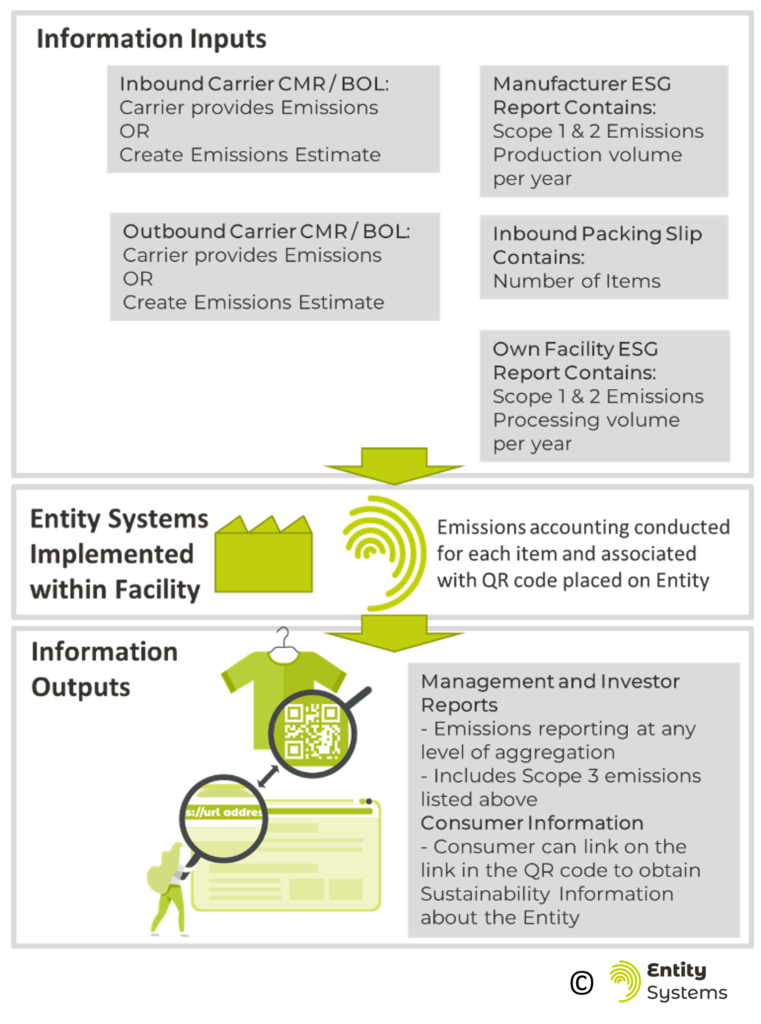
20 Summary
An EMS is a way of keeping track of all the goods that are contained in a business, but in a new way that has been enabled by the Information Technology age. The current Inventory Management paradigm used is based in a paper-based world where information cannot flow easily and pragmatism in reducing the amount of information kept superseded the desire to have more information, and for that information to be more accurate.
The EMS has taken two major theoretical leaps. The first is the idea of naming each Entity separately, with a unique name. The second is to organize all these uniquely named Entities into a hierarchical structure that emulates their real-world existence. These two philosophical leaps have enabled the development of a novel type of information system that can manage goods, a major development that breaks away from the inventory- and table-based systems that were all that existed before the development of the EMS.
Despite having a totally different information structure than inventory-based systems, the EMS can perform all the tasks required of a Warehouse Management System plus provide better metrics on the business’ operations. This means that it can receive goods, track and manage where goods are stored, and translate orders into instructions for workers. Because of the hierarchical data structure, it is also easy to apply the EMS to the Transportation sector, which tends to have lots of goods on pallets in containers on trucks.
Regarding the traceability of goods, the EMS is well positioned to compete with the GS1 standards developed on traceability. The EMS can perform all the functions of serialization within a much simpler conceptual framework. The upcoming regulations in the EU can be managed with an EMS and because of the default nature of the EMS is item-level tracking, any regulations that are added in the future will be able to be handled as well. The EMS has a one-up-one-down approach to traceability where all individual Entities are traceable. This means that the EMS can connect inputs to outputs and report these connections to downstream parties.
Changing from an Inventory to an Entity based system will have tremendous benefits to a company. Easier modeling of the reality of vehicles, buildings, and the stock within them will unlock benefits that are not even suspected of yet. The application of an EMS will enable traceability of goods that to date has been too expensive or too complicated. A future paper from Entity Systems will explore the application of the EMS to a blockchain network and how the blockchain can be used to connect multiple EMS and other systems together to create true decentralized traceability for all consumer goods.
Download the White Paper
- Join our Mailing list and Download!
- PDF copy of the freely available HTML version
- 57 Pages
- ISBN: 978-80-908557-0-0
PART 8: APPENDIX
21 Glossary of Terms
EMS: Entity Management System – A software that organizes its classification of goods according to the ‘Entity’ system of managing goods, defined by proper naming of product instances and hierarchical location modelling.
WMS: Warehouse Management System – A software that handles the day to day operations inside a warehouse or distribution facility. It is capable of keeping track of where goods are in the facility, receiving stock, assembling orders, and shipping orders.
Facility: A physical building that holds stock.
Stock: Physical goods that are owned by a company and are intended to be sold
Entity: In an Entity Management System, this refers to the informational representation of a physical object that is named and labelled. It can refer to a concrete thing like an individual instance of a product to be sold, a box that can hold other entities, a pallet. In addition to a physical object, it can refer to a physical grouping of objects that must be physically present next to each other. Shipment of pallets is an ‘Entity’ that is a grouping of physical objects instead of one concrete physical object. An Entity is represented within the EMS with a folder.
Entity Type: Separates the Entities used in a particular EMS into ‘types’. These types are defined by the existence of their own classification taxonomy.
Taxonomy: refers to a classification based on shared common parameters. For example, a parameter may be ‘Colour’ and this parameter is specified for all items. Or a parameter may be ‘Box Size’ and all Boxes are classified according to this parameter.
Organizational Folders: These are folders that exist within the folder structure of the EMS that do not represent Entities, but serve to organize Entities by their physical presence or absence within the Facility
Upstream: Used to refer to businesses that supply the business in question with goods. These are usually vendors of product, or carriers which bring products to the business
Downstream: Used to refer to businesses or customers which receive goods that are sent from the business. These can include businesses that purchased product, final customers of product, or carriers which moved the product.
Product and SKU (Stock Keeping Unit): These two terms are treated synonymously in this paper. Both refer to the traditional definition within the Inventory Management paradigm. Which is stock that is sold under the same classification, instances of which can be sold interchangeably.
Unique Identifier: This means a UUID. A UUID is a universally unique identifier, which is a 128-bit number which is typically used to identify information in computer systems.
22 References
[1] J.R. Tony Arnold, Stephen Chapman, and Lloyd M. Clive, Introduction to Materials Management, Custom Edi (Upper Saddler River, New Jersey: Prentice Hall, 2012).
[2] P Leach, M Mealling, and R Salz, ‘A Universally Unique Identifier (UUID) URN Namespace’, 2005 <https://www.ietf.org/rfc/rfc4122.txt> [accessed 21 March 2022].
[3] Manu Sporny and others, ‘Decentralized Identifiers (DIDs) v1.0’, W3C, 2021 <https://w3c.github.io/did-core/> [accessed 8 April 2022].
[4] Stack OverFlow, ‘What Are the Options for Storing Hierarchical Data in a Relational Database?’, 2010 <https://stackoverflow.com/questions/4048151/what-are-the-options-for-storing-hierarchical-data-in-a-relational-database> [accessed 1 April 2022].
[5] Wikipedia Foundation, ‘Nested Set Model’ <https://en.wikipedia.org/wiki/Nested_set_model> [accessed 1 April 2022].
[6] Wikipedia Foundation, ‘Proper Name (Philosophy)’, 2022 <https://en.wikipedia.org/wiki/Proper_name_(philosophy)> [accessed 22 March 2022].
[7] GS1, ‘Get a Barcode | GS1’, 2022 <https://www.gs1.org/standards/get-barcodes> [accessed 15 February 2022].
[8] European Commission, ‘Origin Labelling’, 2022 <https://ec.europa.eu/food/safety/labelling-and-nutrition/food-information-consumers-legislation/origin-labelling_en> [accessed 9 March 2022].
[9] SAP, ‘SAP Global Batch Traceability | Batch Traceability’, 2022 <https://www.sap.com/spain/products/global-batch-traceability.html> [accessed 9 March 2022].
[10] Odoo, ‘Traceability in Complex Food Production’, You Tube Video, 2021 <https://www.youtube.com/watch?v=wrh184jYi4Y> [accessed 9 March 2022].
[11] GS1, ‘FAQ: How Does “serialization” Differ from “Unique Identification” in the GS1 System?’ <https://xchange.gs1.org/sites/faq/Pages/how-does-unique-identification-differ-from-serialisation-in-the-gs1-system.aspx> [accessed 15 February 2022].
[12] U.S. Food & Drug Administration, ‘Drug Supply Chain Security Act (DSCSA)’, 2022 <https://www.fda.gov/drugs/drug-supply-chain-integrity/drug-supply-chain-security-act-dscsa> [accessed 9 March 2022].
[13] European Commission, ‘Falsified Medicines’, Directorate-General for Health and Food Safety, 2022 <https://ec.europa.eu/health/medicinal-products/falsified-medicines_en> [accessed 9 March 2022].
[14] European Medicines Verification Organisation, ‘EMVO’, 2022 <https://emvo-medicines.eu/> [accessed 9 March 2022].
[15] Garrison Spik, Dispensers and DSCSA 2023: Verifying and Authenticating Product Identifiers in a Fully Serialized Pharmaceutical Supply Cain, 2021 <https://rfxcel.com/dispensers-dscsa-3ts/>.
[16] Center for Research in Perspective Technologies, ‘For Businesses – Chestny Znak’, 2022 <https://chestnyznak.ru/en/business/>.
[17] Wikipedia Foundation, ‘GS1 – Wikipedia’, Wikipedia, 2022 <https://en.wikipedia.org/wiki/GS1> [accessed 11 March 2022].
[18] GS1 Organization, GS1 Global Traceability Standard, 2017 <http://www.gs1.org/docs/traceability/Global_Traceability_Standard.pdf>.
[19] Nasdaq, ‘Nasdaq ESG Data Portal’, 2022 <https://www.nasdaq.com/sustainability/offerings/ESG-Data-Portal> [accessed 11 March 2022].
[20] Jean Pierre Schweitzer and Isabel Paliotta, ‘Europe Targets Greenwashing and Eco-Labelling for Food’, META from the EEB, January 2022 <https://meta.eeb.org/2022/01/26/europe-targets-greenwashing-and-eco-labelling-for-food/>.
[21] Tara Norton and others, A Guide to Traceability, United Nations Global Compact Office, 2014 <https://www.bsr.org/reports/BSR_UNGC_Guide_to_Traceability.pdf>.
[22] European Commission, Farm to Fork Strategy, DG SANTE/Unit ‘Food Information and Composition, Food Waste’’’, 2020 <https://ec.europa.eu/food/sites/food/files/safety/docs/f2f_action-plan_2020_strategy-info_en.pdf>.
[23] A Bock, L Bontoux, and J Rudkin, Concepts for a Sustainable EU Food System (Luxembourg (Luxembourg): Publications Office of the European Union, 2022) <https://doi.org/10.2760/381319 (online)>.
[24] European Commission, A New Circular Economy Action Plan, COM(2020) 98 Final, 2020 <https://eur-lex.europa.eu/legal-content/EN/TXT/?uri=COM:2020:98:FIN>.
[25] Adisorn, Thomas, Lena Tholen, and Thomas Götz, ‘Towards a Digital Product Passport Fit for Contributing to a Circular Economy’, Energies, 14.2289 (2021) https://doi.org/10.3390/en14082289
[26] European Commission, ‘DIGITAL-2021-TRUST-01-DIGIPASS – Will There Be a DPP per Product Type or Will Each Individual Product Have Its Own DPP?’, 2022 <https://ec.europa.eu/info/funding-tenders/opportunities/portal/screen/support/faq/18186> [accessed 15 March 2022].
[27] European Commission, ‘Carbon Border Adjustment Mechanism: Questions and Answers’, 2021 <https://ec.europa.eu/commission/presscorner/detail/en/qanda_21_3661> [accessed 15 March 2022].
[28] Greenhouse Gas Protocol, Corporate Value Chain (Scope 3) Accounting and Reporting Standard, 2011 <https://ghgprotocol.org/standards/scope-3-standard>.
[29] Security and Exchange Commission, The Enhancement and Standardization of Climate-Related Disclosures for Investors, 2022 <https://doi.org/RIN 3235-AM87>.
[30] Sander de Bruyn, Marnix Koopman, and Robert Vergeer, Carbon Added Tax as an Alternative Climate Policy Instrument, 2015 <https://cedelft.eu/publications/carbon-added-tax-as-an-alternative-climate-policy-instrument/>.